Best Legal Billing Software (2026): A Bookkeeper's Ranking
The best legal billing software for solo attorneys in 2026 is MyCase Basic ($39/user/month annual), or $78/user/month total with the MyCase Accounting add-on for three-way trust reconciliation.
For small firms that need more depth, Clio Manage Essentials ($89/user/month annual) or Advanced ($119/user/month annual).
For firms that want strong built-in legal and trust accounting with the option to keep QuickBooks Online, CosmoLex Core is $99/user/month and Pro is $129/user/month. Pro adds General Ledger & Payables and bank feeds for firms that want to run their business accounting natively inside CosmoLex.
For firms running QuickBooks Online who need legal billing layered on top, LeanLaw Core ($40-55/user/month) or Pro ($55-60/user/month) with a free seat for the bookkeeper.
For firms that need only payment processing, LawPay charges no monthly fee with transaction rates of 2. 99% plus $0.30 per card payment.
Here's what every "best of" list misses: legal billing software is not the same as legal accounting software. Billing handles time, invoices, and trust account transactions. Accounting handles the general ledger, financial statements, and the operating books. Your firm needs both. Most platforms do one well and the other poorly. I'm a law firm bookkeeper who reconciles trust accounts and reviews invoices weekly. This ranking is from inside the books, not from vendor marketing pages.
I am a Clio Certified Partner, MyCase Partner, and QuickBooks ProAdvisor with 25 years of experience across dozens of law firm clients.
What Changed in Legal Billing Software in 2026
Four things shifted in the legal billing software market this year. They matter for solo and small firms making a 2026 decision.
Clio Discontinued Its LawPay Integration
In May 2026, Clio announced it will discontinue its longtime integration with LawPay. Firms using Clio Manage and LawPay together will need to either switch their billing platform or move payment processing to Clio Payments. This is the most disruptive change in the legal billing market this year. If your firm runs both, plan the transition before the integration sunsets.
Clio Manage Restructured Plans
Clio simplified Manage plans in 2026. EasyStart ($49/user/month annual) is the new entry point but excludes trust accounting, so most firms holding client funds will need to skip it. Essentials ($89/user/month annual) covers billing, time tracking, and native trust accounting. Advanced ($119/user/month annual) adds advanced reporting and AI invoice drafting through Clio Manage AI. Complete ($149/user/month) bundles in Clio Grow.
MyCase Repackaged the Accounting Add-On
MyCase moved three-way trust reconciliation into a separate MyCase Accounting add-on at $39/month per accounting user, on top of the $39/user/month Basic subscription. Solo attorneys who hold client funds and need a real three-way reconciliation report are now at $78/user/month total, not $39. The base MyCase Basic plan still includes trust accounting capability, but the audit-ready reconciliation report requires the add-on. Worth knowing before you commit.
Trust Accounting Stayed the Bottleneck
Every legal billing platform claims trust accounting capability. The capability varies widely. Clio Manage Essentials and above, and CosmoLex, have native three-way reconciliation reports. MyCase's reconciliation requires the Accounting add-on. LeanLaw runs trust accounting inside QuickBooks Online itself (works well if your bookkeeper already uses QBO). LawPay handles trust-compliant payment processing but does not produce reconciliation reports. Bill4Time keeps three-way reconciliation behind its Pro tier at $89.99/user/month.
If your firm holds client funds, this is the make-or-break feature. Not the calendar. Not the document automation.
What Should Legal Billing Software Do for a Law Firm?
Before comparing tools, it helps to know what you are actually evaluating. Legal billing software should handle:
Time tracking tied to matters. Every billable entry needs to connect to a specific client matter so invoices pull the right work for the right file.
Invoice generation across billing types. Hourly, flat fee, contingency, and split billing all require different invoice structures. Not every tool handles all of them well.
Online payment processing. Credit card, ACH, and eCheck acceptance built into the invoice so clients can pay when they open it. This is where LawPay started, and it remains the standard for compliant legal payment processing.
Trust and IOLTA payment handling. This is where billing software and trust accounting intersect, and where most firms run into problems. Choosing the right IOLTA trust accounting software is as important as choosing the billing tool itself. When a client pays from retainer, the billing system must communicate with your trust ledger to move funds correctly. Earned fees go to operating. Unearned funds stay in trust. The software needs to track which is which.
LEDES billing for insurance defense. If your firm does insurance defense work, your billing software must generate LEDES-format invoices. Not all tools support this natively.
Client payment reminders. Automated follow-up on unpaid invoices reduces AR aging without adding admin work.
Integration with accounting software. Some legal platforms now offer built-in accounting, while others rely on QuickBooks Online, Xero, or another general ledger. CosmoLex supports both approaches: firms can use its native business accounting or connect CosmoLex to QuickBooks Online. Our accounting software ranking covers the accounting side in detail.
Reporting. AR aging, realization rate, collection rate, and revenue by matter type. If your billing software cannot produce these reports, your financial reporting depends entirely on your accounting system, and the two may not agree.
A law firm billing platform that cannot produce a three-way reconciliation report on demand is not actually doing trust accounting. It is producing trust ledgers. Those are different. The bar audits the reconciliation, not the ledger.
What Is the Best Billing Software for Solo Attorneys?
For solo attorneys billing hourly or flat fee, MyCase and Clio EasyStart are the two options worth comparing.
MyCase keeps billing simple: create invoices, send them, clients pay online. For a solo attorney billing hourly or flat fee, it is perfectly adequate. The interface is clean, onboarding is fast, and the client portal handles payment reminders without intervention. Basic plan starts at $39/user/month (annual billing). The accounting add-on costs $39/month flat and is worth adding if you want built-in trust accounting reports rather than relying on a separate system.
Clio EasyStart ($49/user/month, annual billing) gives you the Clio ecosystem at the lowest tier. Time tracking, basic billing, and the Clio app directory are included. If you think you will grow to 2-3 attorneys within a year, starting with Clio avoids a platform migration later. But at the solo level, the additional features over MyCase may not justify the $10/month difference.
The deciding factor for solos: if you handle client trust funds, check which platform gives you the trust accounting reporting you need at the plan level you can afford. MyCase vs. Clio comes down to trust accounting depth more than billing features for attorneys managing IOLTA accounts.
CosmoLex Core ($99/user/month) and Pro ($129/user/month) combine legal billing, trust accounting, and bank reconciliation within the practice-management platform. Pro adds General Ledger & Payables and bank feeds for firms that want to keep the broader business accounting inside CosmoLex.
CosmoLex now also integrates with QuickBooks Online, so choosing CosmoLex no longer means giving up QBO. For most firms, I prefer CosmoLex + QBO for the broader business accounting because QuickBooks gives the bookkeeping team more flexibility around bank activity, expenses, revenue, account structure, reconciliations, and financial reporting.
For firms that strongly prefer keeping everything inside CosmoLex and whose accounting needs fit the native system, that approach can still work.
For a deeper comparison, see CosmoLex vs. Clio.
What Is the Best Billing Software for Small Law Firms?
At the 2-8 attorney level, trust accounting depth matters more than it does for solos, because the volume of trust transactions increases and the risk of compliance errors compounds with each attorney disbursing from the same account.
Clio Essentials ($89/user/month) or Clio Advanced ($129+/user/month) are the standard choices here. Clio's trust accounting remains the best I have worked in across any practice management platform. The February 2026 launch of Clio Accounting ($29/user/month add-on) means firms can now run billing, trust accounting, and general ledger accounting in one environment without QuickBooks. Clio Accounting supports three-way reconciliation, trust deposits, disbursements, transfers, and six core financial reports. It is cash-basis only in its current release, which means accrual-basis firms and contingency practices should wait.
CosmoLex ($109/user/month) has had built-in accounting since before Clio entered that space. Trust-to-operating transfers post to the general ledger automatically. No separate QuickBooks subscription, no sync issues, no reconciliation between two systems. For firms that want one platform handling everything, CosmoLex vs. Clio is the comparison that matters. The tradeoff: CosmoLex's interface has a steeper learning curve, and the integration ecosystem is smaller than Clio's.
What Software Do Law Firms Use for Billing and Trust Accounting?
How Each Platform Handles Trust Accounting Specifically
Clio Manage Essentials and above ($89/user/month annual) include native trust ledgers per matter, automated three-way reconciliation reports, and IOLTA-compliant payment processing through Clio Payments. The reconciliation runs on demand. Bar audit-ready. Note: Clio EasyStart at $49/user/month excludes trust accounting, so most firms holding client funds need Essentials or higher.
MyCase Basic ($39/user/month annual) includes trust accounting capability for deposits, transfers, and check writing, but the three-way reconciliation report bar auditors want sits inside the MyCase Accounting add-on ($39/month per accounting user). Total cost for a solo attorney with full trust compliance: $78/user/month.
CosmoLex Core and Pro both include trust accounting, client trust ledgers, bank reconciliation, and compliance reporting, including three-way reconciliation. Firms that want CosmoLex to handle the broader business accounting can use Pro, which adds General Ledger & Payables and bank feeds. Firms that prefer QuickBooks Online can instead use CosmoLex’s one-way QBO integration on either Core or Pro.
LeanLaw ($40-60/user/month depending on Core or Pro tier) runs trust accounting inside QuickBooks Online itself. Your bookkeeper sees trust transactions in QBO directly. Three-way reconciliation is built. LeanLaw gives the bookkeeper a free seat (the bookkeeper does not count toward your paid user count). This works exceptionally well if you already use QuickBooks Online; it does not work if you do not.
LawPay charges no monthly subscription fee. Pricing is transaction-based: 2.99% plus $0.30 per card payment, 1% for eChecks (capped at $10), 3.90% plus $0.30 for American Express. LawPay is trust-compliant payment processing only. It does not produce reconciliation reports. Pair LawPay with Clio Manage, MyCase, or QuickBooks Online for the full workflow.
Bill4Time Standard ($59.99/user/month) has trust accounting but reserves three-way reconciliation for the Pro tier at $89.99/user/month. The $30/user jump for compliance features makes Bill4Time less competitive than it once was.
Trust Account Reconciliation: What to Demand From Any Platform
Before signing a contract, ask the vendor to show you:
A three-way reconciliation report (not a trust ledger summary)
The report's audit trail of who entered each transaction and when
How the platform handles bank fees charged to IOLTA (these should never hit trust)
The reconciliation history retention (most state bars require 5-7 years)
If they cannot show you a working three-way reconciliation report on demand during the demo, the platform is not doing trust accounting. It is doing trust-flavored bookkeeping.
1. Clio Manage: Best All-Around
Best for: Small firms (2-8 attorneys) that want billing, trust accounting, and practice management in one platform with the largest integration ecosystem.
What it does well: Clio handles everything from simple hourly to LEDES format for insurance defense work. Time tracking is reliable, invoicing is flexible, and the client portal drives faster collections. Trust accounting is the strongest in the category. The app directory connects to 250+ third-party tools.
Where it falls short: Sometimes need to do detective work to figure out which payment goes with which invoice in MyCase, and the same applies to Clio at scale. Clio Accounting launched in February 2026 and is still a version-one product: cash-basis only, no accrual support, and Clio recommends that contingency and real estate practices wait.
Trust accounting: Built-in. Three-way reconciliation, client ledgers, trust reporting. Best in category.
QBO/accounting integration: Native sync to QuickBooks Online. With Clio Accounting, QBO is now optional. The Clio-QuickBooks integration is solid but requires monitoring. I inherited a QuickBooks file where trust liability was $47,000 more than Clio client balances after 18 months of integration drift.
Pricing: EasyStart $49/user/month, Essentials $89/user/month, Advanced $129+/user/month (annual billing). Clio Accounting add-on: $29/user/month.
My take: Clio is the platform I work in most across my client base. The billing and trust accounting are the reason. When Clio Accounting matures past its v1 limitations, it will be the clear single-system choice for small firms. Today, pairing Clio with QuickBooks Online is still the safer accounting setup for firms that need accrual reporting.
2. CosmoLex: Best Accounting-First Platform with a QBO Option
Best for: Firms that want strong legal billing and trust accounting with the choice between CosmoLex native business accounting and QuickBooks Online.
What it does well: CosmoLex was built with legal accounting at the center of the platform. Billing, client trust ledgers, bank reconciliation, compliance reporting, and three-way reconciliation are closely connected to the matter-management workflow.
Core includes trust accounting, compliance reporting, and bank reconciliation. Pro adds General Ledger & Payables and bank feeds for firms that want to run the broader business accounting inside CosmoLex.
Where it falls short: CosmoLex’s native accounting environment is more constrained than QuickBooks Online for broader business financial management, and its third-party integration ecosystem is smaller than Clio’s.
Trust accounting: Built in. Client-level trust ledgers, bank reconciliation, compliance reporting, and three-way reconciliation are part of the CosmoLex legal-accounting workflow.
QBO/accounting integration: CosmoLex now integrates with QuickBooks Online on both Core and Pro. Data flows one way from CosmoLex to QBO. When the QBO integration is enabled, CosmoLex Business Accounting and Matter Budgets are unavailable.
Pricing: $99/user/month and Pro is $129/user/month on monthly billing. Annual billing currently saves $120 per user per year.
My take: The QuickBooks integration materially improves CosmoLex for me.
Practice-management-native accounting is designed around legal workflows. QuickBooks Online is designed around running the business.
I can work with either configuration, but for most firms I prefer CosmoLex + QBO because QuickBooks gives the bookkeeping team more flexibility around bank activity, expenses, revenue, reconciliations, account structure, and financial reporting. If a firm strongly prefers keeping everything inside CosmoLex and its accounting needs fit the native system, that can still work.
The goal is not the fewest software platforms. The goal is the cleanest financial system.
3. MyCase: Best for Simplicity
Best for: Solo attorneys and small firms that want clean, simple billing without a steep learning curve.
What it does well: MyCase keeps billing simple. Create invoices, send them, clients pay online. The interface is intuitive, the client portal is solid, and the mobile app works. Recently merged under the 8am (formerly AffiniPay) umbrella alongside LawPay, which means payment processing is tightly integrated.
Where it falls short: Sometimes need to do more detective work to figure out which payment goes with which invoice. The accounting add-on is functional but not as deep as CosmoLex or Clio Accounting for trust reporting.
Trust accounting: Available on all plans. Accounting add-on ($39/month flat) adds deeper trust reports.
QBO/accounting integration: Syncs to QuickBooks Online. The MyCase accounting features work for basic trust tracking, but firms with high trust volume should evaluate whether the reporting meets their bar's requirements.
Pricing: Basic $39/user/month, Pro $89/user/month, Advanced $109/user/month (annual billing). Accounting add-on: $39/month flat.
My take: MyCase is where I send solo attorneys who want to stop thinking about their billing software and start getting paid. It does the job without overcomplicating it. For a solo billing hourly or flat fee, it is perfectly adequate.
4. LeanLaw: Best QBO Add-On
Best for: Firms already running QuickBooks Online that need legal-specific billing, time tracking, and trust accounting layered on top.
What it does well: LeanLaw sits on top of QuickBooks Online and adds what QBO lacks: matter-based time entry, legal invoicing, LEDES billing (Pro plan), and trust accounting. For firms with multiple trust accounts and high transaction volume, the native QBO integration is better than what Clio or MyCase offer through their sync.
Where it falls short: LeanLaw is not practice management software. No case management, no document storage, no client portal. It is a billing overlay for QBO.
Trust accounting: Built on QBO's ledger structure. Handles multiple trust accounts well. Automates trust-to-operating transfers within QuickBooks.
QBO/accounting integration: Native. LeanLaw lives inside QBO, not alongside it.
Pricing: Core $55/user/month, Pro $75/user/month (annual billing). Pro adds LEDES billing, custom fields, and matter-based accounting. Requires a separate QuickBooks Online subscription.
My take: If your firm is committed to QuickBooks and not willing to switch, LeanLaw is the strongest legal billing layer available. The trust accounting integration with QBO is tighter than any sync-based connection from Clio or MyCase. The tradeoff is that you are managing two subscriptions and LeanLaw gives you billing only.
5. LawPay: Best for Payments Only
Best for: Firms that already have billing software and need compliant payment processing, or solo attorneys who want the simplest possible way to accept client payments.
What it does well: LawPay is approved by bar associations in all 50 states. IOLTA-compliant payment processing means client trust funds and operating funds are routed to the correct accounts. Credit card, ACH, and eCheck processing. Since merging with MyCase under the 8am brand, LawPay also includes basic time tracking and invoicing on its Grow and Pro plans.
Where it falls short: LawPay is a payment processor first. The billing features added in recent years work for simple invoicing but do not match the depth of Clio, MyCase, or CosmoLex for matter-based billing.
Trust accounting: IOLTA-compliant payment routing. Funds are directed to the correct account (trust vs. operating) at the transaction level.
QBO/accounting integration: Syncs payment data to QuickBooks Online.
Pricing: Starter $20/month, Grow $70/month, Pro $149/month. Processing fees: 2.99% + $0.30 per credit card transaction, 1% (capped at $10) for eCheck.
My take: LawPay solves one problem well: getting paid while staying compliant. If you already have a billing system and just need payment processing, the Starter plan at $20/month is the most affordable entry point on this list.
6. Smokeball: Best for Document-Heavy Firms
Best for: Firms with high document volume (real estate, estate planning, immigration) that want automated document assembly alongside billing.
What it does well:Smokeball's document automation is its strength. Auto-generated documents from matter data, deep template libraries, and automatic time tracking that captures work without manual entries. Billing is solid on the Boost plan and above.
Where it falls short: Full trust account integration with QBO is only available on higher-tier plans (Boost and above). The Bill plan ($49/user/month) has General Ledger integration only, meaning trust transactions do not sync to QuickBooks on the entry-level billing plan. That is a significant limitation for firms with IOLTA obligations.
Trust accounting: Available, but QBO trust sync requires Boost plan ($89/user/month) or higher.
QBO/accounting integration: One-way sync from Smokeball to QBO. General Ledger only on Bill plan. Full trust integration on Boost and above.
Pricing: Bill $49/user/month, Boost $89/user/month. Higher tiers available by quote.
My take: If your practice runs on documents and you want your billing software to also handle document automation, Smokeball is worth evaluating. But confirm the trust accounting features match your compliance needs at the plan level you are considering. The Bill plan limitation on trust-to-QBO sync catches firms off guard.
7. TimeSolv: Best Standalone Billing
Best for: Firms that want dedicated billing and time tracking software without practice management features they do not need.
What it does well: TimeSolv focuses on billing. Time tracking, invoicing, LEDES billing, expense tracking, and payment processing through TimeSolvPay. Over 30 built-in reports covering revenue, realization, and AR aging. Supports both QuickBooks and Xero integrations.
Where it falls short: No case management, no client portal, no document management. TimeSolv is billing software, not practice management. Firms that need those features will run a second platform alongside it.
Trust accounting: Built-in trust accounting with three-way reconciliation and trust reporting.
QBO/accounting integration: Syncs to both QuickBooks Online and Xero.
Pricing: Starts at approximately $39.95/user/month for 1-4 users (annual billing). Volume discounts for larger firms.
My take: TimeSolv is the pick for firms that already have a case management system they like and want standalone billing that does not try to replace it. The LEDES support and reporting depth are strong for a billing-only tool.
Does Legal Billing Software Handle Trust Accounting?
This is the section no other listicle covers, and it is the section that matters most if your firm holds client funds.
Billing software generates the invoice. Trust accounting tracks the funds. These are two separate functions, and the gap between them is where compliance errors happen.
When a client pays an invoice from their retainer, several things must happen in sequence: the billing system records the payment, the trust ledger debits the client's trust balance, and the earned fees transfer from your IOLTA account to your operating account. If the billing software and trust ledger are not communicating correctly, you end up with discrepancies between what your billing system says a client owes and what your trust ledger says you are holding.
I have seen this firsthand. I inherited a QuickBooks file where the trust liability balance was $47,000 more than the sum of client balances in Clio after 18 months of integration. The billing side looked fine. The accounting side looked fine. But the two systems had drifted apart because the sync was not catching every trust transaction correctly. It took a full bookkeeping cleanup to reconcile them.
This is why your billing software choice affects your bookkeeper's ability to keep you compliant. Here is how the top platforms handle the billing-to-trust bridge:
Clio Manage keeps billing and trust in one system with shared client ledgers. When Clio Accounting is added, the general ledger also lives in the same environment. This reduces (but does not eliminate) sync risk. The three-way reconciliation runs inside the platform.
CosmoLex can handle billing, trust accounting, and general ledger accounting inside one platform when the firm uses its native business accounting. Firms that prefer QuickBooks Online can now use a different configuration: billing and trust records remain in CosmoLex while business-accounting data flows one way into QBO. The number of handoff points therefore depends on which accounting setup the firm chooses.
MyCase handles trust at the billing level but relies on QBO for the accounting side. The sync works, but it requires monitoring, and errors in the sync surface as IOLTA compliance problems that may not be visible until reconciliation.
LeanLaw takes a different approach: it builds legal trust accounting directly inside QuickBooks. Because LeanLaw and your general ledger are the same system (QBO), the billing-to-trust-to-accounting chain has fewer handoff points.
The firm that chooses billing software without considering how it connects to trust accounting is the firm that ends up with a $47,000 discrepancy and a cleanup bill. A dedicated legal bookkeeper catches these integration failures before they compound.
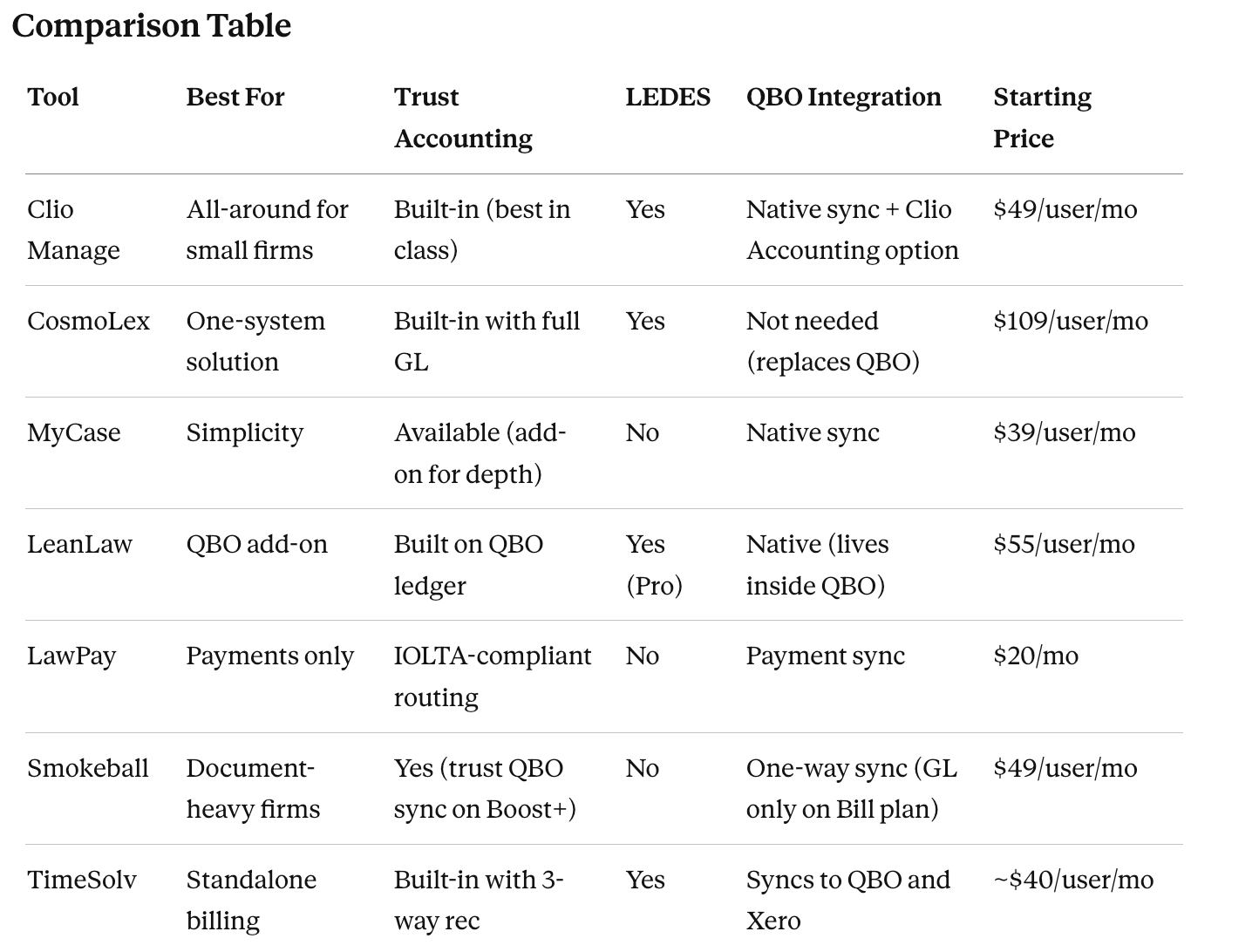
How Much Does Legal Billing Software Cost?
Why Does Billing Software Choice Affect Trust Compliance?
Attorneys evaluate billing software by how it looks on screen: the invoice template, the timer, the payment notification. A bookkeeper evaluates it by what happens after the invoice is paid.
Payment matching errors. When a client pays $5,000 but the invoice was for $4,800, where does the $200 go? Some platforms apply the overpayment to the next invoice automatically. Others leave it as an unallocated payment that sits in your trust account until someone investigates. Both are correct in different contexts, and neither is obvious to the attorney who sent the invoice.
Trust sync failures. When your billing platform records a trust-to-operating transfer but QuickBooks does not pick it up, your books show the money in two places, or nowhere. These failures are silent. They do not trigger an error message. They show up three months later when your trust account reconciliation does not balance.
Why this matters for your choice. The billing software your firm selects determines how much time your bookkeeper spends reconciling, investigating discrepancies, and correcting entries that the sync got wrong. A platform that handles the billing-to-trust-to-accounting chain cleanly saves your firm hours every month. A platform that does not costs you more in bookkeeping time than the subscription fee you saved.
Software alone cannot replace the oversight a bookkeeper provides. But the right software makes that oversight faster and more reliable.
Your billing software choice affects more than your invoices. It affects your trust accounting compliance, your bookkeeping costs, and whether your books can survive a bar audit. If you are not sure which platform fits your firm, we can review your current setup and tell you where the gaps are.
Book a discovery call and see what clean, compliant books should look like. Need help deciding which billing software your firm should run, or want help configuring trust accounting properly inside the platform you already chose? See Law Firm Bookkeeping or Trust Account Reconciliation & IOLTA Cleanup.
Frequently Asked Questions About Legal Billing Software
-
MyCase at $39/user/month is the best starting point for solo attorneys handling fewer than 50 active matters. For solo attorneys who hold client funds and need three-way trust reconciliation, the MyCase Accounting add-on ($39/user/month additional) is required. Total: $79/user/month. Clio Manage Essentials at $89/user/month includes trust accounting natively if you prefer not to pay for an add-on.
-
Clio Manage Essentials ($89/user/month) or Advanced ($129+/user/month) is the strongest option for small firms with 2-8 attorneys. Clio Manage Advanced includes AI-powered invoice drafting through Clio Manage AI, advanced reporting, and approval workflows. CosmoLex ($109/user/month) is the strongest alternative for firms that want billing and accounting in one system without QuickBooks.
-
Some platforms include trust accounting natively (Clio, CosmoLex, TimeSolv) while others offer it as an add-on (MyCase accounting add-on at $39/month) or require a separate accounting system (LeanLaw builds trust accounting inside QuickBooks Online). The depth of trust accounting features varies significantly by platform and plan tier. Verify that the plan you are considering includes three-way reconciliation and client-level trust ledgers before committing.
-
Legal billing software ranges from $20/month (LawPay Starter, payment processing only) to $129+/user/month (Clio Manage Advanced). Solo attorney pricing typically lands at $39-89/user/month. Small firm pricing typically lands at $89-130/user/month per attorney. Add-ons for trust accounting, accounting, or AI features add $20-50/user/month on top.
-
It depends on the platform. Clio Manage, CosmoLex, and TimeSolv include trust accounting natively. MyCase requires the MyCase Accounting add-on ($39/user/month) for full three-way reconciliation. LeanLaw runs trust accounting inside QuickBooks Online. LawPay is trust-compliant payment processing only. Before signing, ask the vendor to demonstrate a three-way reconciliation report.
-
LEDES (Legal Electronic Data Exchange Standard) is a standardized billing format required by insurance companies and many corporate legal departments. If your firm handles insurance defense, corporate matters, or any work where the client requires LEDES-formatted invoices, your billing software must export LEDES. Clio, CosmoLex, Smokeball, Bill4Time, PCLaw, and Time59 support LEDES. Many simpler platforms do not.
-
The most common setup is Clio Manage for practice management and billing paired with QuickBooks Online for the general ledger. Your bookkeeper works in both systems and reconciles between them monthly. CosmoLex is the alternative for firms that want billing, trust accounting, and general ledger accounting in one platform without QuickBooks. LeanLaw takes a third approach by building legal billing and trust accounting directly inside QuickBooks Online, so the bookkeeper works in one system. The right setup depends on your trust transaction volume and how many systems you want your bookkeeper maintaining. Higher volume means more reconciliation work, which favors single-system platforms like CosmoLex or Clio with Clio Accounting over two-system setups that require manual sync verification.
-
Legal billing software handles time tracking, invoicing, payment processing, and trust account transactions per matter. Legal accounting software handles the general ledger, financial statements, payroll, expense management, and the firm's operating books. Your firm needs both. The most common setup is Clio Manage (billing) plus QuickBooks Online (accounting), connected through an integration. Some platforms like CosmoLex combine both into one system.
-
Not by itself. QuickBooks Online lacks per-matter time tracking, trust account ledgers, and legal-specific billing workflows. The standard configuration is LeanLaw ($55/user/month) layered on top of QuickBooks Online to add legal billing capability. Alternatively, use Clio Manage for billing and connect it to QuickBooks Online for the operating books.
-
Yes. Clio Manage integrates bidirectionally with QuickBooks Online. Invoices, payments, and accounting entries flow between systems automatically. The integration is included with Clio Manage at no additional charge. CosmoLex also integrates with QuickBooks Online. MyCase requires the MyCase Accounting add-on for full QuickBooks-equivalent functionality.
-
Time59 at $19.95/month (flat rate, unlimited users) is the cheapest legal billing platform with native trust accounting and LEDES billing support. Bill4Time at $29/user/month is the next cheapest. Both work well for solo and small firms that need basic billing and trust capability without case management features.
Should solo attorneys pay extra for AI features in legal billing software?
For solo attorneys handling fewer than 30 active matters per year, AI invoice drafting saves marginal time. The cost ($30-50/user/month for Clio Manage AI or comparable features) rarely justifies the savings at solo volume. Once a firm scales past 50-75 active matters or 3+ attorneys, AI invoice drafting starts paying back the subscription cost. Solo attorneys are better served by mastering the base platform first.