Clio vs MyCase: A Law Firm Bookkeeper’s Honest Comparison
If you’re a solo or small firm attorney trying to decide between Clio and MyCase, here’s the short answer: Clio is the stronger platform overall, especially for firms that care about trust accounting accuracy and clean financial reporting. MyCase is simpler, more affordable, and perfectly fine for solo practitioners who want something straightforward.
That said, the right choice depends on your firm size, how you handle billing, and whether you’re planning to grow. I’m a certified partner for both platforms. I work inside them every single day doing bookkeeping, trust accounting, and IOLTA reconciliations for law firms. This isn’t a feature checklist I pulled from a website. This is what I’ve seen actually play out in practice.
In This Post:
Quick Comparison at a Glance
Trust Accounting and IOLTA Compliance
QuickBooks Online Integration
Billing and Invoicing
Ease of Use
Pricing (Updated for 2026)
Which One Should You Choose?
What Neither Platform Will Tell You
Frequently Asked Questions
Quick Comparison at a Glance
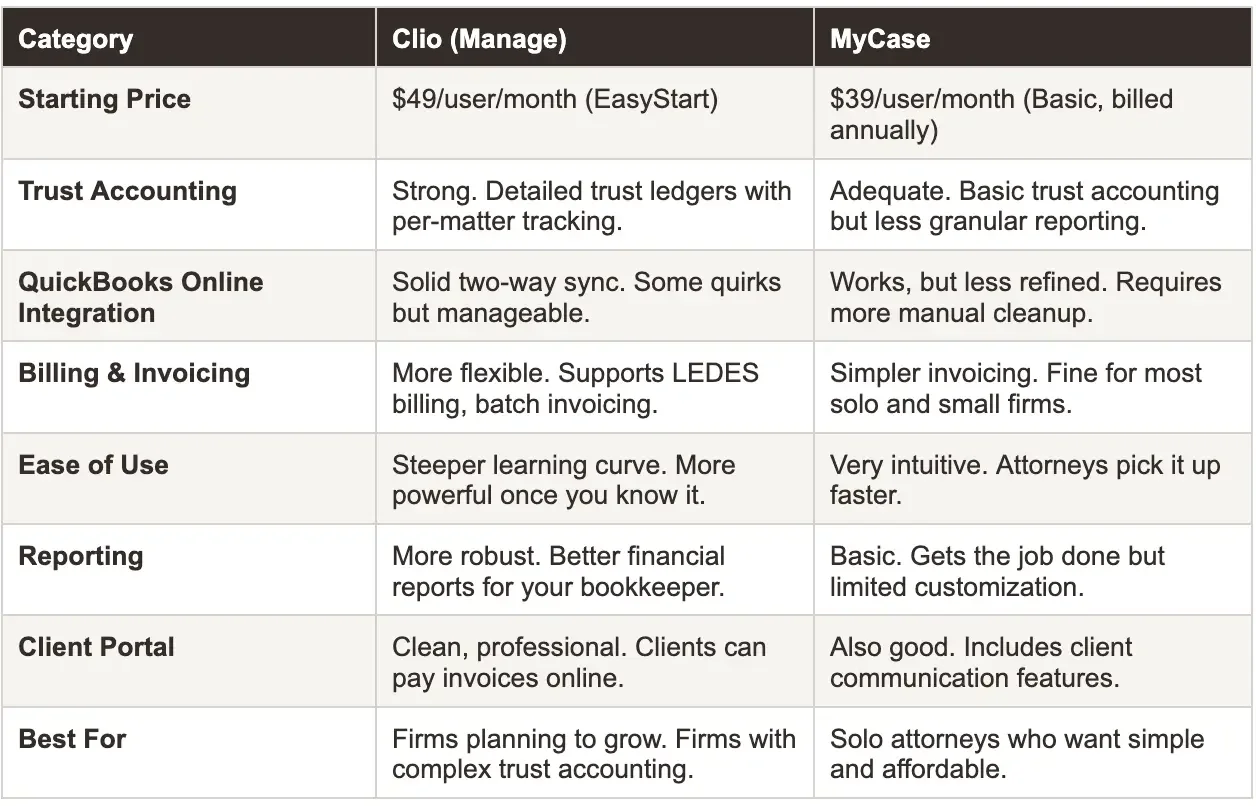
Trust Accounting and IOLTA Compliance
This is where it matters most for law firms, and it’s where I see the biggest difference between the two platforms.
Clio’s trust accounting is more detailed. You get per-matter trust ledgers, clear audit trails, and reports that actually make sense when you’re doing a three-way reconciliation at month end. When I’m reconciling a firm’s IOLTA account in Clio, I can pull the reports I need without spending an hour reformatting data. The trust transaction history is clean enough that if your state bar came knocking, you’d feel confident handing it over.
MyCase handles trust accounting, but it’s not as granular. The reporting is more basic, and depending on your state’s requirements, you might find yourself exporting data and manually building reconciliation reports. For a solo practitioner with a handful of trust transactions per month, this is probably fine. For a firm with 3 or more attorneys and active trust activity, it starts to feel thin.
Bottom line: If trust accounting compliance is a priority for your firm - and it should be - Clio gives you and your bookkeeper better tools to keep it clean.
QuickBooks Online Integration
Both platforms integrate with QuickBooks Online, and I use both integrations regularly. Neither is perfect, but Clio’s is more mature.
Clio’s QBO sync handles invoice data, payment data, and expense tracking reasonably well. There are still quirks—you’ll occasionally see sync errors that need manual attention, and the way it maps certain transactions to your QBO chart of accounts requires some initial setup to get right. But once it’s configured properly, it runs fairly smoothly.
MyCase’s QBO integration works, but I find myself doing more manual cleanup. Data doesn’t always land in QBO the way you’d expect, and if your bookkeeper isn’t checking it regularly, things can get messy fast. It’s not a dealbreaker, but it does add time to the monthly bookkeeping process.
What I tell attorneys: Whichever platform you choose, don’t assume the QBO integration means your books are automatically accurate. You still need someone reviewing the sync regularly, catching errors, and making sure trust and operating funds aren’t getting crossed.
Billing and Invoicing
Clio offers more billing flexibility. If your firm does any kind of complex billing - split billing, LEDES format for insurance defense work, batch invoicing across multiple matters - Clio handles it. The billing workflows are more customizable, which matters as your firm grows and you’re dealing with different fee arrangements.
MyCase keeps it simple. You create invoices, send them, clients pay online. For a solo attorney billing hourly or flat fee, it’s perfectly adequate. You’re not going to feel limited unless your billing needs start getting more complex.
One thing I notice from the bookkeeping side: Clio’s invoicing data is easier to reconcile because it’s more structured. When I’m matching payments in QBO to invoices in Clio, the data is cleaner. With MyCase, I sometimes need to do more detective work to figure out which payment goes with which invoice.
Ease of Use
This is where MyCase wins. If you’re a solo attorney who doesn’t want to spend two weeks learning a new system, MyCase is going to feel more intuitive right out of the box. The interface is cleaner, there are fewer menus to dig through, and most attorneys can start using it productively within a day or two.
Clio has a steeper learning curve. It’s more powerful, but that power comes with complexity. You’ll spend more time in the settings, more time configuring workflows, and more time figuring out where things live. For attorneys who are comfortable with technology, this is fine. For attorneys who just want to track time and send invoices, it can feel like overkill.
Honest take: I’ve seen attorneys switch from Clio to MyCase because Clio felt like too much. And I’ve seen attorneys switch from MyCase to Clio because they outgrew it. Both are valid moves depending on where your firm is right now.
Pricing (Updated for 2026)
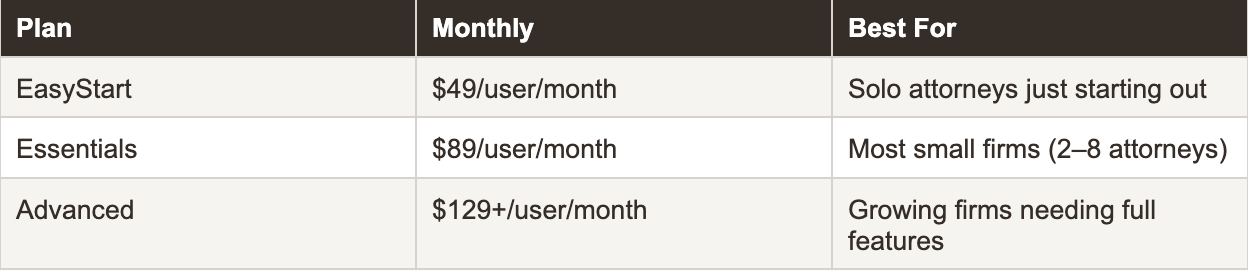
Clio Manage Pricing:
MyCase Pricing:
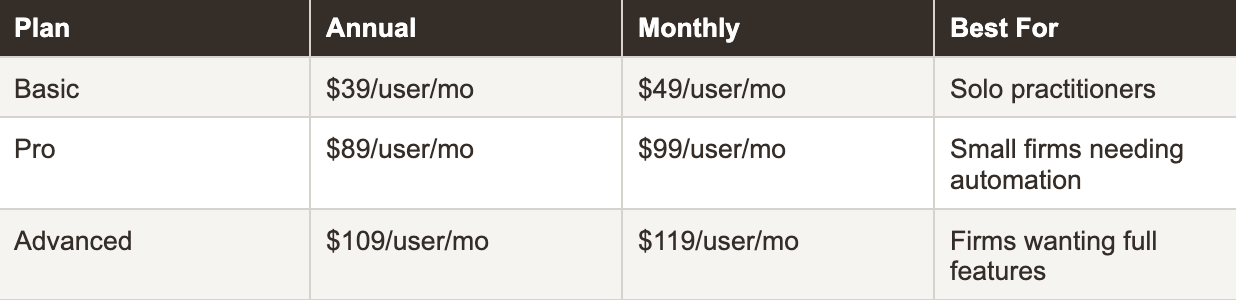
For a solo attorney watching expenses, that price difference matters. For a firm with 4–5 users, it adds up quickly. But I’d caution against choosing practice management software purely on price. The cost of cleaning up messy trust accounting because your software couldn’t handle it properly is a lot more than $20 a month.
Which One Should You Choose?
Choose Clio if:
Your firm has 2 or more attorneys
You handle significant trust or IOLTA funds
You plan to grow your firm in the next 1–3 years
You want robust reporting and financial data
You work with a bookkeeper who needs access to detailed trust accounting reports
Choose MyCase if:
You’re a solo practitioner
You want something simple that works right away
Your trust accounting volume is low
Budget is a primary concern
You value ease of use over advanced features
What Neither Platform Will Tell You
No practice management software replaces proper bookkeeping. I see this constantly - attorneys assume that because Clio or MyCase tracks their billing and trust transactions, their books are in order. They’re not.
Practice management software tracks what happens inside your firm. Bookkeeping makes sure what’s in your software matches what’s in your bank accounts. Without someone reconciling those two things every month, you’re flying blind. Your trust account could be out of balance. Your revenue numbers could be wrong. And you wouldn’t know until tax season or, worse, a bar audit.
Whichever platform you choose, make sure someone - whether it’s you or your bookkeeper - is actually reconciling your practice management data against QuickBooks and your bank statements every single month. That’s the part that keeps your firm compliant and your finances accurate.
For a deeper look at what proper law firm bookkeeping actually involves - and what to look for when hiring - visit our law firm bookkeeping services.
About the Author
Amy is the founder of Accounting Atelier, a boutique bookkeeping firm that works exclusively with solo and small law firms. She’s a QuickBooks Online ProAdvisor, Clio Certified Partner, and MyCase Partner with over 25 years of small business accounting experience. She and her team handle monthly bookkeeping, trust accounting, IOLTA compliance, and three-way reconciliations for law firms across the country.
If your firm needs help with trust accounting, IOLTA compliance, or just wants clean books every month, book a free consultation at accountingatelier.com/contact
Frequently Asked Questions
-
For most solo attorneys, MyCase is the better starting point. It’s less expensive, easier to learn, and handles basic case management and billing well. That said, if you handle a high volume of trust transactions or plan to hire associates in the near future, starting with Clio can save you the headache of migrating later.
-
Yes, both integrate with QuickBooks Online. Clio’s integration is more mature and tends to sync data more cleanly. MyCase’s integration works but may require more manual review from your bookkeeper to ensure accuracy. Neither integration is set-it-and-forget-it—regular reconciliation is still necessary.
-
Clio has the edge here. Its trust accounting features are more detailed, with better per-matter tracking and reporting that supports three-way reconciliations. For firms that need to produce trust account reports for state bar compliance, Clio’s tools are more comprehensive. MyCase handles basic trust accounting but has less granular reporting.
-
Clio starts at $49 per user per month (EasyStart) with most small firms using the $89 Essentials plan. MyCase starts at $39 per user per month (Basic, billed annually) or $49 billed monthly, with Pro at $89 and Advanced at $109 annually. For a solo attorney, the price difference between comparable plans is roughly $10–20 per month.
-
Yes. Practice management software tracks your firm’s activities—time entries, invoices, trust transactions. But it doesn’t reconcile your bank accounts, ensure your trust account balances match your ledgers, or produce accurate financial statements. A bookkeeper who understands law firm accounting ensures your books are compliant, accurate, and ready for tax season or a state bar audit.
-
Yes, attorneys switch between platforms regularly. Both offer data migration support, though the process isn’t always seamless. Plan for 2–4 weeks of transition time and make sure your bookkeeper is involved to ensure trust accounting data transfers accurately. Export everything before you start.
-
Clio provides the reports needed to perform a three-way reconciliation between your trust ledger, bank statement, and individual client balances. MyCase’s reporting is more limited for this purpose, and you may need to export data and build the reconciliation manually or use QuickBooks alongside it. Either way, having a bookkeeper who understands three-way reconciliation is essential for IOLTA compliance.