Clio Pricing Breakdown: What Every Plan Actually Costs in 2026
Clio pricing starts at $49 per user per month for EasyStart and goes up to $149 per user per month for Complete. But the sticker price does not tell the full story. After setting up Clio for dozens of law firms, I can tell you that the plan you choose directly affects your accounting workflow, your trust accounting capabilities, and how much time your bookkeeper spends every month. Here is what each plan actually includes, what is missing, and which one makes sense for your firm.
What Is Clio and How Is It Structured?
Clio is actually a suite of products, not a single app. The three main products are:
Clio Manage - practice management, billing, trust accounting, and client communication. This is what most firms mean when they say "Clio."
Clio Grow - client intake and CRM. Handles lead tracking, online scheduling, intake forms, and e-signatures.
Clio Draft - document automation. Generates legal documents from templates with auto-populated fields.
You can buy each product separately or bundle them. Most firms start with Clio Manage and add the others later. For accounting and bookkeeping purposes, Clio Manage is the product that matters - it is where billing, trust accounting, and financial data live.
Clio Manage Pricing Plans (2026)
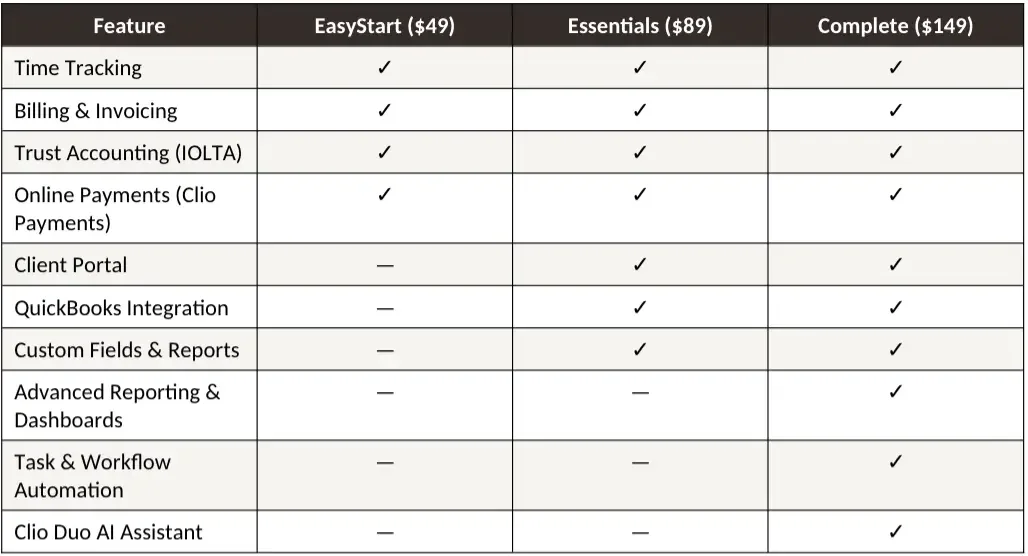
All prices are per user per month, billed annually. Month-to-month billing is approximately 10 to 15 percent higher.
A Bookkeeper's Take: Which Plan Do You Actually Need?
EasyStart ($49/user/month) - The Problem
EasyStart includes time tracking, billing, and trust accounting, which sounds complete. But it is missing the QuickBooks integration. That means your bookkeeper has to manually enter every transaction from Clio into QBO instead of syncing them automatically. For a firm billing even 20 matters a month, this adds hours of manual data entry and increases the risk of errors.
The other major gap is the lack of custom reports. Your bookkeeper cannot pull the detailed trust ledger or billing reports needed for efficient reconciliation. Everything has to be done through Clio's basic reporting, which is limited.
Bottom line: EasyStart saves money on the subscription but costs more in bookkeeping time. I rarely recommend it for firms that want clean books.
Essentials ($89/user/month) - The Sweet Spot
This is the plan I recommend for most small law firms. The QuickBooks integration alone justifies the step up from EasyStart. Your bookkeeper can sync invoices, payments, and trust transactions directly to QBO without manual entry. Custom fields let you tag matters for better financial reporting. The client portal reduces payment friction, which means faster collections.
From a bookkeeping perspective, Essentials gives you everything you need for clean monthly closes, accurate trust reconciliations, and reliable financial statements. The $40 per user premium over EasyStart typically saves more than that in reduced bookkeeping hours.
Complete ($149/user/month) - Worth It for Growing Firms
Complete adds advanced reporting, workflow automation, and Clio Duo (their AI assistant). The advanced reporting is genuinely useful for firms with 3 or more attorneys because it provides better visibility into realization rates, collection rates, and productivity by timekeeper. The workflow automation reduces administrative overhead.
Whether the extra $60 per user over Essentials is worth it depends on firm size. For a solo, probably not. For a 3 to 5 attorney firm, the reporting and automation features start paying for themselves quickly.
Need help setting up Clio the right way? We handle Clio configuration, QuickBooks integration, trust accounting setup, and monthly bookkeeping for small law firms. Learn more about our services →
Hidden Costs Most Firms Miss
The per-user price is not the total cost of running Clio. Here are the additional expenses I see firms overlook:
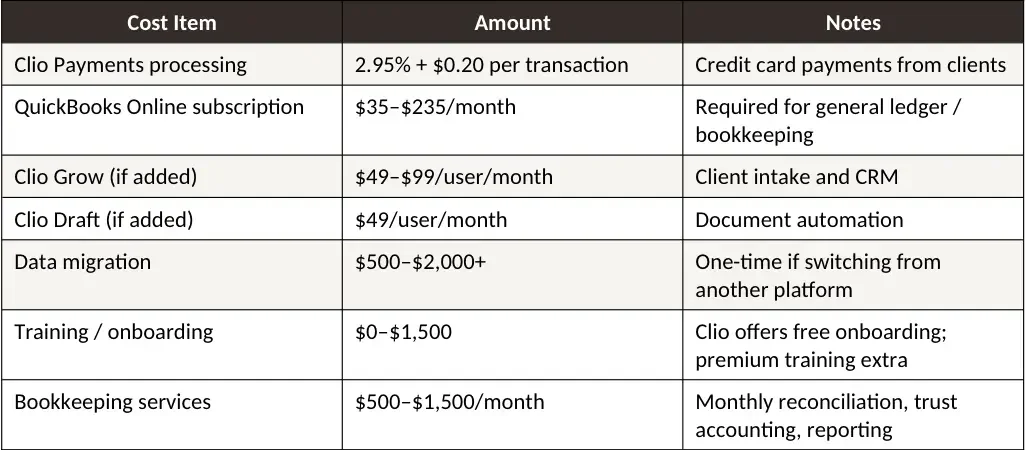
For a solo attorney on Essentials with QBO and Clio Payments, the true monthly cost is approximately $150 to $175 before bookkeeping. For a 3-attorney firm on Complete with QBO, expect $550 to $700 per month in software costs alone.
How Clio Pricing Compares to Alternatives
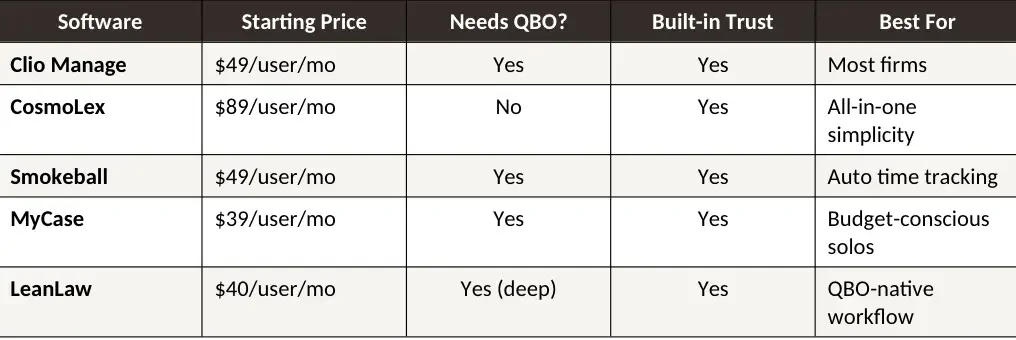
Clio's pricing sits in the middle of the market. It is more expensive than MyCase but less expensive than CosmoLex per user. The key difference is that CosmoLex includes built-in accounting and eliminates the need for QBO, while Clio requires a separate QBO subscription. When you factor in QBO costs, Clio Essentials plus QBO often costs about the same as CosmoLex.
Read my full comparisons: Clio vs MyCase | Clio vs Smokeball | Best Accounting Software for Law Firms
Is Clio Worth the Price?
Yes, for most small law firms. Here is my honest assessment after working inside Clio for years:
Clio is worth it if:
You want the deepest integration ecosystem in legal tech (200+ integrations)
You need a platform your bookkeeper can sync with QuickBooks reliably
You value a polished client portal for payment collection
You plan to grow and want a platform that scales to 50+ users
You want access to Clio's industry data and benchmarking (from their annual Legal Trends Report)
Clio may not be worth it if:
You are a solo on a tight budget and MyCase at $39/month covers your needs
You want built-in accounting without a separate QBO subscription (look at CosmoLex)
You need deep document automation out of the box (Smokeball includes this; Clio charges extra for Draft)
You primarily do flat-fee work with simple billing needs
Frequently Asked Questions
-
Clio Manage starts at $49 per user per month for EasyStart, $89 for Essentials, and $149 for Complete when billed annually. Month-to-month billing costs approximately 10 to 15 percent more. Most firms also need a separate QuickBooks Online subscription ($35 to $235 per month) for general bookkeeping.
-
EasyStart covers basic time tracking, billing, and trust accounting. However, it lacks the QuickBooks integration, which means your bookkeeper has to enter data manually. For most solos who want clean books and efficient monthly closes, Essentials is the better value despite the higher price.
-
Clio includes trust accounting and billing but does not include general ledger accounting. You still need QuickBooks Online or a similar platform for bank reconciliations, financial reporting, payroll integration, and tax preparation. Clio syncs billing and payment data to QBO through its native integration on Essentials and Complete plans.
-
Yes. All Clio Manage plans include trust accounting features. You can create client trust ledgers, record trust deposits and disbursements, and generate trust reports. However, your bookkeeper still needs to perform three-way reconciliations using the trust ledger, bank statement, and client balances to stay compliant with your state bar.
-
It depends on your priorities. Clio has a larger integration ecosystem, a more polished interface, and better scalability for growing firms. CosmoLex includes built-in accounting that eliminates the need for a separate QBO subscription. From a bookkeeper's perspective, Clio plus QBO is more flexible; CosmoLex is more streamlined. For a detailed comparison, read my full CosmoLex vs Clio breakdown.
-
Clio is mid-range for legal practice management software. EasyStart at $49 per user per month is comparable to MyCase and Smokeball entry plans. Essentials at $89 per user per month is the most popular tier and competitive with CosmoLex. The total cost depends on add-ons: most firms also pay for QuickBooks Online ($35 to $235 per month), Clio Payments processing (2.95% plus $0.20 per transaction), and potentially Clio Grow or Draft. For a solo attorney on Essentials with QBO, expect approximately $150 to $175 per month in total software costs before bookkeeping services.
-
Clio Payments charges 2.95% plus $0.20 per credit card transaction and 1% for eCheck and ACH payments. These fees are competitive with LawPay and other legal payment processors. Clio Payments is available on all Manage plans and handles both operating and trust account deposits with automatic payment-to-invoice matching.
-
Yes. Clio offers a 7-day free trial with full access to all features. No credit card is required to start. This is enough time to test the interface and basic workflows but not enough to evaluate accounting integrations thoroughly. I recommend requesting a demo and asking specifically about the QBO sync and trust accounting features.
About the Author
Amy is the founder of Accounting Atelier, a bookkeeping firm that specializes in law firm accounting. She works inside platforms like Clio, MyCase, CosmoLex, and Smokeball daily, handling trust accounting, monthly reconciliations, and financial reporting for small law firms across the country.
→ Need help with your law firm's books? Learn about our services.