Clio vs Smokeball: A Law Firm Bookkeeper’s Honest Comparison
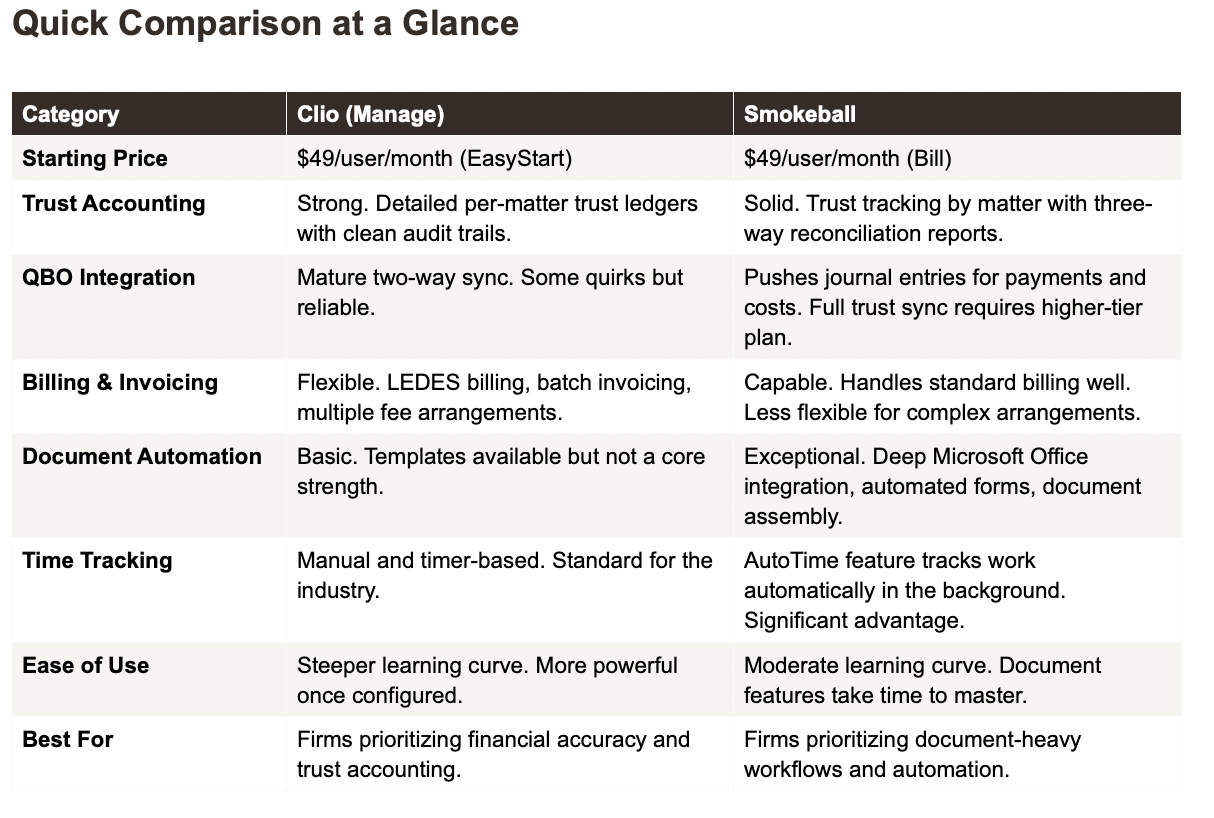
Clio is the stronger platform for trust accounting and financial reporting. Smokeball is the stronger platform for document automation and automatic time tracking. That’s the short answer from someone who works inside both platforms doing bookkeeping, trust accounting, and IOLTA reconciliations for law firms.
These two platforms approach practice management from different angles. Clio was built around billing and client management. Smokeball was built around document automation and workflow efficiency. Which one is right for your firm depends on what your biggest pain point is - financial accuracy or operational speed.
Here’s how they compare on the things that actually matter from a bookkeeping perspective.
In This Post:
Quick Comparison at a Glance
Trust Accounting and IOLTA Compliance
QuickBooks Online Integration
Billing and Invoicing
Document Automation (Smokeball’s Edge)
Ease of Use
Pricing (Updated for 2026)
Which One Should You Choose?
What Neither Platform Will Tell You
Frequently Asked Questions
Trust Accounting and IOLTA Compliance
This is where the decision starts for most law firms, and it’s where I spend the most time inside both platforms.
Clio’s trust accounting is more detailed and more bookkeeper-friendly. You get per-matter trust ledgers, clean audit trails, and reports that make three-way reconciliations straightforward. When I’m reconciling a firm’s IOLTA account in Clio, I can pull the reports I need without reformatting anything. If your state bar came knocking, you’d feel confident handing over Clio’s trust reports.
Smokeball’s trust accounting is solid but approaches it differently. It tracks trust transactions by client matter, can produce trust reconciliation reports, and even has safeguards that prevent you from over-drafting a trust account. The three-way reconciliation feature works. Where Smokeball falls short compared to Clio is in the granularity of reporting — the trust reports aren’t as detailed, and if you need custom trust reports for state bar compliance, you may find yourself doing more work outside the platform.
One important limitation: Smokeball’s Bill plan (the lowest tier at $49/user/month) includes trust accounting features but does not include full trust account integration with QuickBooks. You need a higher-tier plan for that. With Clio, trust-to-QBO syncing is available on the Essentials plan ($89/user/month).
Bottom line: If trust accounting compliance is your primary concern, Clio gives your bookkeeper better tools. If your trust volume is low and document automation matters more, Smokeball is adequate.
QuickBooks Online Integration
Both platforms integrate with QuickBooks Online, and the quality of that integration matters enormously for your monthly bookkeeping.
Clio’s QBO sync is more mature. It handles invoice data, payment data, and expense tracking with a two-way sync. There are still quirks - you’ll occasionally see sync errors that need manual attention, and the chart of accounts mapping requires proper setup. But once it’s configured, it runs reliably and your bookkeeper can work efficiently.
Smokeball’s QBO integration pushes journal entries for payments received against operating account invoices and for costs advanced and reimbursed. It works, but it’s a one-way push rather than a full two-way sync. This means your bookkeeper may need to do more reconciliation work in QBO to ensure everything lines up.
The bigger issue with Smokeball: the full trust account integration with QBO is only available on higher-tier plans. If you’re on the Bill plan, you get General Ledger integration but not trust account syncing. That means your bookkeeper would need to manually enter trust transactions in QBO - which defeats the purpose of integration.
What I tell attorneys: Whichever platform you choose, don’t assume the QBO integration means your books are automatically accurate. Someone needs to review the sync regularly, catch errors, and make sure trust and operating funds aren’t getting crossed.
Billing and Invoicing
Clio offers more billing flexibility. If your firm does complex billing - split billing, LEDES format for insurance defense work, batch invoicing across multiple matters - Clio handles it. The billing workflows are customizable, which matters as your firm grows and you’re dealing with different fee arrangements.
Smokeball handles standard billing well. You can create invoices, track time, and accept payments through integrated payment processors like LawPay. For most solo and small firm billing needs - hourly, flat fee, or contingency - Smokeball works fine. Where it gets thin is complex multi-party billing or LEDES requirements.
From the bookkeeping side: Clio’s invoicing data is more structured and easier to reconcile. The payment-to-invoice matching is cleaner, which means less detective work during monthly reconciliation.
Document Automation (Smokeball’s Edge)
This is where Smokeball genuinely outperforms Clio. Smokeball was built around document automation. The deep Microsoft Office integration means you can auto-populate legal documents, create document sets, and assemble complex filings directly from matter data. For litigation-heavy or document-heavy practice areas, this is a real time-saver.
Smokeball’s document management also includes form libraries, automated templates, and the ability to generate entire document packages from a single matter. If your firm produces a high volume of court filings, contracts, or estate planning documents, this feature alone could justify the platform choice.
Clio has document templates and basic automation, but it’s not a core strength. Clio was built around billing and client management first, document management second. For firms where documents are the bottleneck, Smokeball has a clear advantage.
From a bookkeeping perspective: Document automation doesn’t directly affect your financial workflows. I mention it because it’s the main reason firms choose Smokeball over Clio - and you should know that choosing Smokeball for its document features means accepting a slightly less polished financial and trust accounting experience.
Ease of Use
Neither platform is truly simple. Both have learning curves, just in different areas.
Clio’s learning curve is in configuration. You’ll spend time setting up billing workflows, mapping QBO integrations, and configuring trust accounts. Once it’s set up, daily use is straightforward.
Smokeball’s learning curve is in its document features. The platform has a lot of power in its automation tools, but learning to use them effectively takes time. The billing and trust accounting side is more intuitive out of the box, but less powerful than Clio.
One standout feature: Smokeball’s AutoTime automatically tracks the work you do in the background - emails sent, documents opened, time spent in files. For attorneys who forget to start timers (which is most attorneys), this can capture billable time that would otherwise be lost. Clio requires manual timer entry.
Pricing (Updated for 2026)
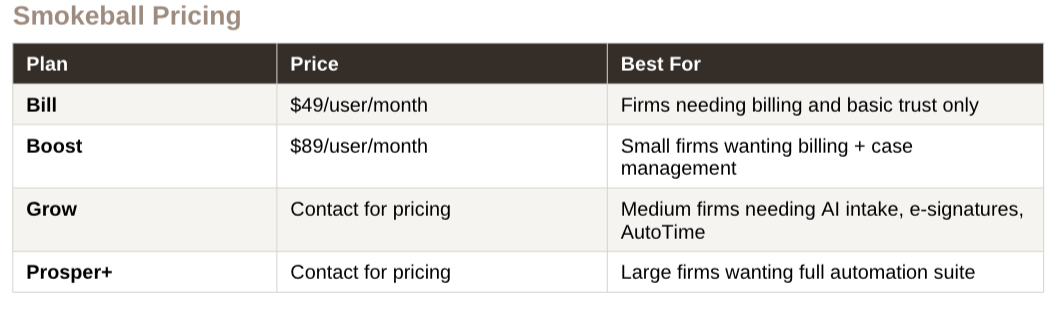
A note on Smokeball’s pricing: the Grow and Prosper+ plans require contacting sales for a quote, which makes direct comparison difficult. Some users have reported significant price increases at renewal. Make sure you understand the long-term cost before committing to a multi-year contract.
Smokeball’s main competitors include Clio, MyCase, CosmoLex, and PracticePanther — all of which we compare in detail across our legal software series.
Which One Should You Choose?
Choose Clio if:
Trust accounting and IOLTA compliance are a top priority for your firm
You need robust financial reporting and clean QBO integration
You handle complex billing (LEDES, split billing, batch invoicing)
You plan to grow your firm and need a platform that scales financially
Your bookkeeper needs reliable access to detailed trust reports
Choose Smokeball if:
Document automation is your biggest bottleneck
You’re in a document-heavy practice area (litigation, estate planning, real estate)
Automatic time tracking (AutoTime) would capture significant lost billable hours
Your trust accounting volume is low and basic trust features are sufficient
You want deep Microsoft Office integration for document workflows
What Neither Platform Will Tell You
No practice management software replaces proper bookkeeping. I see this constantly - attorneys assume that because Clio or Smokeball tracks their billing and trust transactions, their books are in order. They’re not.
Practice management software tracks what happens inside your firm. Bookkeeping makes sure what’s in your software matches what’s in your bank accounts. Without someone reconciling those two things every month, you’re flying blind. Your trust account could be out of balance. Your revenue numbers could be wrong. And you wouldn’t know until tax season or, worse, a bar audit.
Whichever platform you choose, make sure someone - whether it’s you or your bookkeeper - is actually reconciling your practice management data against QuickBooks and your bank statements every single month. That’s the part that keeps your firm compliant and your finances accurate.
For a deeper look at what proper law firm bookkeeping actually involves - and what to look for when hiring - visit our law firm bookkeeping services.
Related ReadingTrust Accounting for Law Firms:
Three-Way Reconciliation for Law Firms →
Clio vs MyCase: A Law Firm Bookkeeper’s Honest Comparison →
Frequently Asked Questions
-
Clio has the edge for trust accounting. Its per-matter trust ledgers are more detailed, the audit trails are cleaner, and the reports are better suited for three-way reconciliations and state bar compliance. Smokeball’s trust accounting works but is less granular, especially on the lower-tier plans.
-
Yes, Smokeball integrates with QuickBooks Online by pushing journal entries for payments and costs. However, full trust account integration with QBO is only available on higher-tier plans (Boost and above). The Bill plan only includes General Ledger integration, meaning trust transactions would need manual entry in QBO.
-
Smokeball’s AutoTime feature tracks work automatically in the background - emails, documents, and file activity. It captures time that attorneys typically forget to record. It’s not perfect (you’ll still need to review and adjust entries), but it can recover significant billable hours that would otherwise be lost.
-
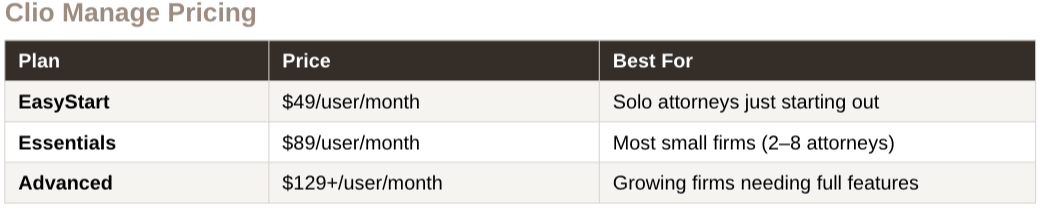
Both start at $49 per user per month for their entry-level plans. Clio’s Essentials plan (the most popular for small firms) is $89 per user per month. Smokeball’s Boost plan is also $89. For higher tiers, Smokeball requires contacting sales for a quote, while Clio’s Advanced plan is $129+ per user per month.
-
Yes. Practice management software tracks your firm’s activities but does not reconcile your bank accounts, ensure your trust account balances match your ledgers, or produce accurate financial statements. A bookkeeper who understands law firm accounting ensures your books are compliant, accurate, and ready for tax season or a state bar audit.
-
Yes, but plan for 2–4 weeks of transition time. Both platforms offer data migration support, though the process requires careful attention to trust accounting data. Make sure your bookkeeper is involved in the migration to ensure trust balances transfer accurately and nothing falls through the cracks.
-
No. Smokeball and Clio are competing practice management platforms and do not integrate with each other. If you need to switch from one to the other, both offer data migration support, but plan for 2 to 4 weeks of transition time. Your bookkeeper should be involved to ensure trust accounting data transfers accurately.
About the Author
Amy is the founder of Accounting Atelier, a boutique bookkeeping firm that works exclusively with solo and small law firms. She’s a QuickBooks Online ProAdvisor, Clio Certified Partner, and MyCase Partner with over 25 years of small business accounting experience. She and her team handle monthly bookkeeping, trust accounting, IOLTA compliance, and three-way reconciliations for law firms across the country.
If your firm needs help with trust accounting, IOLTA compliance, or just wants clean books every month, book a free consultation at accountingatelier.com/contact