Clio Accounting Review (2026): A Law Firm Bookkeeper's Honest Take
I am Amy Coats, founder of Accounting Atelier and a Clio Certified Partner. I have been working inside Clio Manage for years, reconciling trust accounts, configuring QuickBooks integrations, and closing the books for solo and small law firm clients. In February 2026, Clio launched Clio Accounting, a built-in general ledger and financial management tool that lives inside Clio Manage. The question every attorney and bookkeeper is asking: does it replace QuickBooks?
The short answer is that it depends on your firm. For solo attorneys who want to stop paying for and maintaining a separate QuickBooks Online subscription, Clio Accounting covers the core general ledger functions you need. For firms with more complex accounting requirements, a CPA who works in QBO, or payroll running through QuickBooks, you will likely keep both. Either way, Clio's trust accounting remains the best I have worked in across any practice management platform.
What Is Clio Accounting?
Before February 2026, Clio Manage handled trust accounting, billing, and time tracking, but you needed QuickBooks Online or Xero for everything else: bank reconciliation, financial statements, chart of accounts management, and general ledger accounting. That meant maintaining two systems, syncing data between them, and paying for both subscriptions.
Clio Accounting changes that. According to Clio's official announcement, it is a built-in accounting module that adds general ledger capabilities directly inside Clio Manage. You get bank account connections through Plaid, automatic transaction matching, account reconciliation, journal entries, a chart of accounts, and financial reporting. All of it syncs with your existing Clio Manage data, so case revenue, billing, and trust activity flow into your accounting records without manual entry.
The reports available in Clio Accounting include profit and loss statements, balance sheets, cash flow statements, reconciliation reports, a general ledger, and trial balances. For a solo or small firm, that covers the financial statements you need for monthly bookkeeping and year-end tax preparation.
This is a meaningful shift. Clio was always the strongest practice management platform for trust accounting. Now it is making a case for handling the rest of your firm's financial management too.
How Good Is Clio's Trust Accounting?
The trust accounting in Clio is the most detailed of any practice management platform I work in, and the new Clio Accounting product does not change that. It builds on it.
Per-matter trust ledgers are clean. Every deposit, disbursement, and transfer ties back to a specific client and matter with a complete audit trail. When you run a three-way reconciliation, the bank balance, book balance, and individual client ledger balances reconcile against each other with the granularity state bars expect.
If your state bar came knocking, you would feel confident handing over Clio's trust reports. Whether you are complying with ABA Model Rule 1.15 or state-specific trust accounting rules in California, New York, Texas, or Florida, the detail is there: transaction-level audit trails, per-client ledger balances, reconciliation history, and the ability to pull reports formatted for compliance review. I have worked in platforms where generating a bar-ready trust report means exporting to Excel and rebuilding it manually. Clio does not put you in that position.
As of January 2026, Clio Accounting also gives each trust ledger account its own trust clearing account ledger, which adds another layer of tracking for firms that move money between trust and operating accounts frequently.
For firms where IOLTA compliance and trust accounting are a daily concern, this is where Clio earns its price. No other practice management platform I work in gives you this level of trust reporting without exporting data to a third-party tool.
Does Clio Accounting Replace QuickBooks?
This is the question I have been getting from clients since the launch, and the honest answer requires splitting it into two groups.
For solo attorneys and firms with simple accounting needs: yes, Clio Accounting can replace QuickBooks Online. If your firm bills clients, collects payments, pays operating expenses, and needs monthly financial statements, Clio Accounting handles that inside the platform. You connect your bank account through Plaid, categorize and match transactions, reconcile monthly, and pull your P&L and balance sheet without logging into QBO. For a solo practitioner who was paying $30-50/month for QBO on top of Clio, eliminating that subscription and the sync maintenance that comes with it is a real savings in both money and time.
For firms with complex accounting workflows: you are probably keeping QBO. If your CPA works in QuickBooks for tax preparation, if you run payroll through QBO or a payroll service that integrates with it, or if you need accounting features that Clio Accounting has not built out yet, QuickBooks stays in the stack. Clio Accounting is new. It launched in February 2026. The core features are there, but it does not yet have the depth of an accounting platform that has been in market for decades.
My recommendation for most of the firms I work with: if you are a solo attorney on Clio and your current QBO usage is limited to bank reconciliation and basic financial statements, try Clio Accounting. If your firm has two or more attorneys, a CPA managing your books in QBO, or any integration dependencies tied to QuickBooks, keep the QBO integration and revisit Clio Accounting in six to twelve months as the product matures.
I have been testing Clio Accounting since it launched. The transaction matching works well, the reconciliation process is clear, and the reports cover the essentials. What I am watching for is how it handles edge cases: multi-entity firms, complex chart of accounts setups, and the kind of cleanup scenarios where QBO's flexibility has been hard to replace.
How Does the Clio QuickBooks Integration Work?
For firms that keep QuickBooks alongside Clio, the QBO integration remains the most mature of any practice management platform I work in.
It handles invoice data, payment data, and expense tracking with a two-way sync. Once configured correctly, it runs reliably. The key word is "correctly." The chart of accounts mapping during initial setup is where most integration problems start. If the mapping is off, you spend every month fixing categorization errors instead of closing the books.
There are quirks. You will occasionally see sync errors that need manual attention, and certain transaction types require verification to confirm they landed in the right QBO accounts. But compared to MyCase's QBO integration, Clio's requires significantly less monthly cleanup time.
One important detail: the EasyStart plan ($49/user/month) does not include the QuickBooks integration. You need Essentials ($89/user/month) or higher. If you are on EasyStart and want accounting functionality, Clio Accounting as an add-on may be your better path since it is available on all plans.
What Can Clio Handle for Billing and Invoicing?
Clio handles billing from basic hourly rates to LEDES format for insurance defense work. For solo attorneys, the billing workflow is clean: track time, generate invoices, send them through the client portal, and accept online payments. For firms billing across multiple matters or using split billing, Clio supports those workflows without the limitations you hit in simpler platforms.
The billing data flows directly into your accounting records, whether you are using Clio Accounting or the QBO integration. Payments get categorized, trust applications are tracked, and the revenue shows up where it should for monthly reporting. This is where having billing, trust accounting, and general ledger accounting in the same system starts to show its value. Fewer handoffs between systems means fewer places for data to break.
For how Clio's billing compares to MyCase, CosmoLex, and LeanLaw, see the full billing software ranking.
How Much Does Clio Accounting Cost?
Here is how the pricing breaks down for firms that want accounting functionality in Clio:
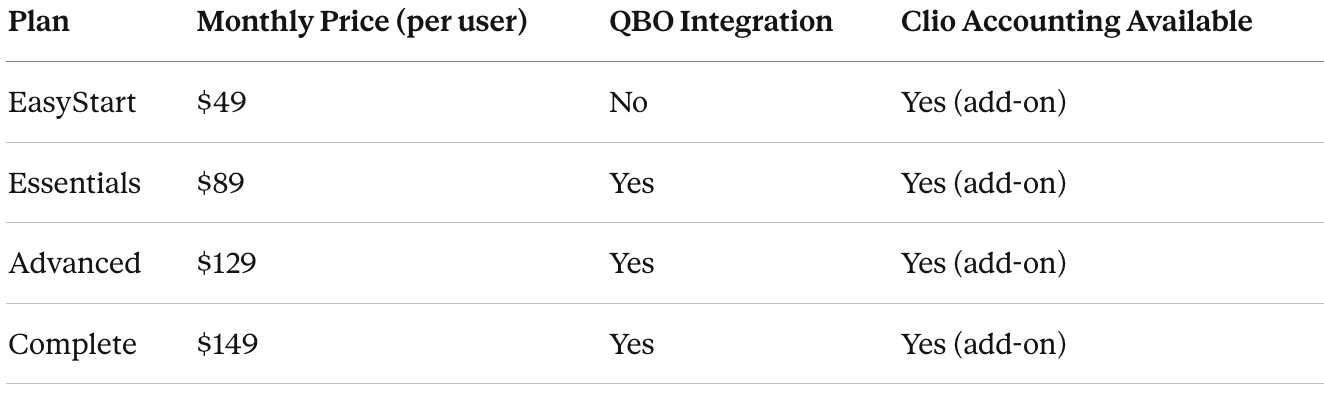
Clio Accounting add-on: $29/user/month with annual billing, per Clio's pricing page. Clio includes one free Clio Accounting user license per subscription, so a solo attorney gets one seat included.
For a solo attorney on EasyStart: $49/month for Clio Manage, and Clio Accounting may be included with the free license. That puts the all-in cost for practice management plus accounting at roughly $49-78/month depending on your plan and billing cycle, which is competitive with MyCase Basic plus its accounting add-on ($78/month).
For the full tier-by-tier breakdown including what each plan includes and excludes, I have a complete Clio pricing analysis here.
Who Is Clio Accounting Best For?
Clio is the right fit if:
Your firm handles significant trust volume and needs per-matter trust ledgers with detailed audit trails. You want the deepest practice management platform available for solo and small firms. You are ready to invest time in proper setup and configuration, or you hire a bookkeeper who knows the platform. You want your billing, trust accounting, and general ledger in one system and are willing to use Clio Accounting instead of QBO.
Look elsewhere if:
Budget is the primary driver and you need the lowest possible monthly cost. MyCase starts lower and covers the basics. You want built-in accounting without any learning curve. Clio has a steeper setup process than MyCase or Smokeball. You need a platform where general ledger accounting has been native for years rather than newly launched. CosmoLex has had built-in accounting longer and may have more depth in that specific area today.
I have seen attorneys feel overwhelmed by Clio who would have been fine on MyCase. The depth is there, but it comes with complexity. If your practice is basic billing with minimal trust activity, you may be paying for features you will not use.
How Does Clio Compare to CosmoLex and MyCase for Accounting?
Clio vs. CosmoLex: CosmoLex has offered built-in accounting without a QuickBooks dependency for years. If you want one platform that handles practice management, trust accounting, and general ledger accounting, CosmoLex has the longer track record in accounting specifically. Clio's advantage is deeper practice management and a significantly larger user base, which means more integrations and a bigger support ecosystem. Now that Clio Accounting exists, the gap in accounting functionality is closing. Full comparison here.
Clio vs. MyCase: MyCase is simpler, more affordable, and better suited for solo attorneys who want something that works on day one. Its accounting add-on ($39/month) handles the basics, but the trust accounting is less granular, the QBO integration requires more cleanup, and the reporting does not match what Clio produces. For firms that will grow or that handle meaningful trust volume, Clio is the stronger long-term choice. Full comparison here. I also published a standalone MyCase Accounting review that covers its features in detail.
Where Clio Accounting fits: It is the middle ground. Deeper practice management than CosmoLex, now with built-in accounting, but the accounting module is one month old. For a broader look at all the options, I maintain a law firm accounting software comparison and an IOLTA trust accounting software guide that cover all the major platforms.
Frequently Asked Questions
-
Clio Accounting is a built-in accounting module launched in February 2026 that adds general ledger capabilities to Clio Manage. It includes bank account connections, transaction matching, account reconciliation, journal entries, chart of accounts management, and financial reporting (profit and loss, balance sheet, cash flow, general ledger, trial balance, and reconciliation reports).
-
For solo attorneys with standard accounting needs, yes. Clio Accounting handles bank reconciliation, transaction categorization, and financial statements inside Clio without a separate QBO subscription. For firms with CPAs working in QuickBooks, payroll integrations tied to QBO, or complex accounting workflows, you will likely keep both systems.
-
Yes. Clio's trust accounting is the most detailed of any practice management platform I work in. It includes per-matter trust ledgers, three-way reconciliation, complete audit trails, and trust reports formatted for state bar compliance. Trust accounting has been in Clio for years and is independent of the new Clio Accounting add-on.
-
Clio Accounting is available as an add-on on all four Clio Manage plans (EasyStart, Essentials, Advanced, and Complete) at $29/user/month with annual billing. Clio includes one free accounting user license per subscription. Trust accounting and billing are included in all Clio Manage plans by default. The QuickBooks Online integration requires Essentials ($89/month) or higher.
-
Clio offers deeper practice management features and stronger trust accounting reporting. CosmoLex has offered built-in general ledger accounting longer, so its accounting module is more mature. If accounting depth is the primary concern and you want to avoid QBO entirely, CosmoLex has the longer track record. If you want the most complete practice management platform with accounting now built in, Clio with Clio Accounting is the stronger overall package.
-
Yes. Clio Accounting includes one free user license per subscription, and additional accounting user seats are $29/user/month (annual billing). Your bookkeeper can access the accounting module directly to reconcile accounts, categorize transactions, and generate financial reports without needing a full Clio Manage seat.
-
Yes. Clio supports three-way trust reconciliation that compares your bank balance, book balance, and individual client trust ledger balances. The reconciliation reports include transaction-level detail and audit trails that match what state bars require under Rule 1.15 compliance reviews.
-
Clio Accounting costs $29/user/month with annual billing ($39/user/month on monthly billing). One free accounting user license is included with every Clio Manage subscription. Clio Manage plans start at $49/user/month for EasyStart.
If you use Clio and need help configuring Clio Accounting or your QuickBooks integration for trust accounting, or if your trust account needs reconciliation and cleanup before the numbers are reliable, that is what we do.