MyCase Accounting Review (2026): A Law Firm Bookkeeper's Honest Take
I am a MyCase Partner. I work inside the platform every week reconciling trust accounts, cleaning up QuickBooks integrations, and closing the books for solo and small law firm clients. This review covers what MyCase accounting actually does well, where it falls short, and who should be using it.
The short version: MyCase is a good practice management platform for solo attorneys who want something that works without a steep learning curve. The accounting add-on handles the basics of trust accounting and financial tracking. But from a bookkeeper's perspective, there are specific limitations on trust accounting depth and QuickBooks integration that attorneys need to understand before they commit.
What MyCase Accounting Actually Does
MyCase added its built-in accounting module in 2022, and the platform has grown since then. It is now part of the 8am platform alongside LawPay, CasePeer, and DocketWise.
The accounting features live inside MyCase itself, not in a separate application. That means your case data, time entries, invoices, and financial records sit in the same system. For a solo attorney managing their own books, this removes the friction of logging into multiple platforms.
Here is what the accounting module covers: trust account tracking with three-way reconciliation, bank account connections through Plaid, automatic transaction matching, case revenue allocation and reporting, and expense reassignment across matters. MyCase also includes automated IOLTA safeguards designed to flag common compliance issues before they become problems.
On paper, this covers the core needs. In practice, the experience depends on how much trust activity your firm handles and how clean you need your books to be.
Trust Accounting in MyCase: What Works and What Doesn't
This is the section that matters if you handle client funds.
MyCase offers three-way reconciliation, which is the minimum standard for IOLTA compliance. It compares your bank balance, book balance, and individual client ledger balances to confirm everything ties out. The automated IOLTA safeguards add a layer of protection by flagging potential issues like negative client balances or trust-to-operating transfers that do not match an invoice.
For a solo practitioner with a handful of trust transactions per month, this is probably fine. The per-client trust tracking works, the reconciliation process is clear, and the safeguards catch the most common mistakes.
Where it gets thin is reporting depth. The trust accounting reports in MyCase are more basic than what you will find in platforms like Clio or CosmoLex. Depending on your state's requirements, you may find yourself exporting data and manually building reconciliation reports to match the format your bar expects. States with detailed trust accounting rules under Rule 1.15 often require specific report formats that MyCase does not generate natively.
For a firm with three or more attorneys and active trust activity, it starts to feel thin. The granularity is not there for high-volume trust work, and the reporting gaps mean more time spent outside the platform building what the platform should produce on its own.
Bottom line on trust: If you run a solo practice with moderate trust activity, MyCase handles it. If trust accounting is a significant part of your practice, or if your state bar has detailed reporting requirements, you will likely outgrow it.
MyCase + QuickBooks Integration: A Bookkeeper's Take
The QuickBooks Online integration is one of the first things attorneys ask about, and the honest answer is: it works, but expect to budget extra time for cleanup.
MyCase syncs invoices, payments, and expenses to QuickBooks Online. The connection is there, and for basic bookkeeping, it moves data between the two systems. But data does not always land in QBO the way you would expect. Payment categorization can be inconsistent, and if your bookkeeper is not checking the integration regularly, things get messy fast.
I find myself doing more manual cleanup with MyCase-to-QBO than I do with Clio's QuickBooks integration. Part of this is how MyCase structures its data export, and part of it is the matching logic on the QBO side. Either way, the result is the same: someone needs to review the sync regularly, or you end up with miscategorized transactions and reconciliation headaches at month-end.
There is also the payment matching issue. When payments come in through LawPay and sync to both MyCase and QBO, it sometimes takes detective work to figure out which payment goes with which invoice. For a solo attorney processing a few payments a week, this is manageable. For a firm processing dozens of trust and operating payments monthly, it adds real time to the bookkeeping process.
This is not a dealbreaker. But if you are comparing MyCase to other platforms, factor in the ongoing bookkeeping maintenance the integration requires. A clean integration saves your bookkeeper time. A messy one costs you money every month.
Billing and Invoicing
MyCase keeps billing simple: create invoices, send them, and clients pay online through the LawPay integration. For a solo attorney billing hourly or flat fee, it is perfectly adequate.
The invoice templates are clean, the client portal makes it easy for clients to view and pay bills, and the LawPay connection means you do not need a separate payment processor. Online payments get deposited directly, and the system tracks which invoices are paid, outstanding, or overdue.
Where billing gets limited is in complexity. If you bill across multiple matters for the same client, split bills between responsible parties, or need detailed trust application reporting on your invoices, you will hit walls. MyCase is building out split billing (it is listed as coming soon), but as of March 2026 it is not yet available.
The payment tracking issue carries over from the accounting side. Here is a common scenario: a client sends one check that covers a flat fee plus a cost reimbursement, and part of that payment needs to go to operating while the rest stays in trust. In MyCase, sorting out where that money landed and confirming the split posted correctly requires manual review. You are opening the invoice, checking the payment record, then cross-referencing in QBO to make sure both sides match. Platforms with more mature accounting modules handle that split in fewer steps, with less room for error.
For how MyCase's billing compares to Clio, CosmoLex, and other platforms, see the full billing software ranking.
MyCase Pricing Breakdown (2026)
MyCase offers three plans, plus add-ons for accounting and payments:
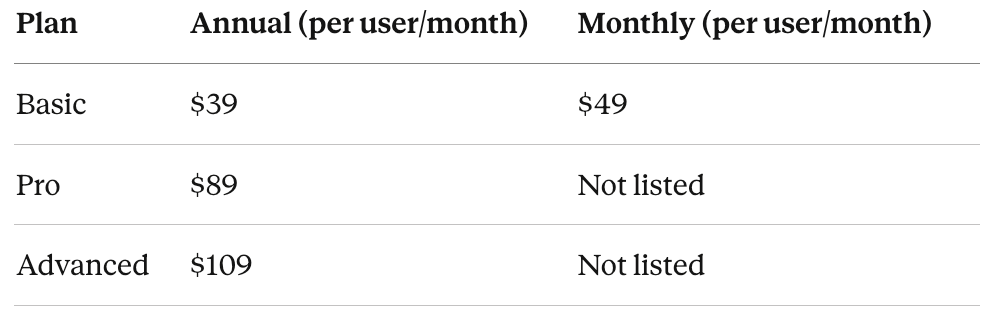
Add-ons:
MyCase Accounting: $39/month per accounting user
LawPay Payments: $0/month (processing fees apply)
The real cost for a solo attorney who wants both practice management and accounting on Basic: $78/month billed annually. On Pro with accounting: $128/month. These are competitive prices compared to Clio (which starts at $49/month for the base plan and goes up quickly with add-ons), but the comparison only holds if MyCase's feature set covers what your firm actually needs.
The accounting add-on is a separate subscription, not built into the base plans. If you are on Basic for case management only and later decide you want the accounting features, that is an additional $39/month. Worth knowing before you commit to a plan.
Who MyCase Is Built For (And Who Should Look Elsewhere)
After working inside the platform across multiple client firms, the pattern is clear.
MyCase works well for:
Solo attorneys starting or running a small practice who want case management, billing, and basic accounting in one platform without a long setup process. Attorneys with low to moderate trust transaction volume who need IOLTA tracking but are not dealing with complex multi-state compliance. Budget-conscious firms that need the core tools without paying for features they will not use. Attorneys who want to be productive in the software within a day or two, not a week of onboarding.
Look elsewhere if:
Your firm handles significant trust volume or multi-state IOLTA compliance. You need detailed trust reporting formatted for state bar audits. You are growing past three attorneys and need deeper financial reporting and practice analytics. You want your practice management and accounting fully integrated without relying on QuickBooks as the backbone of your financial records.
I have seen attorneys switch from MyCase to Clio because they outgrew it. That is not a knock on MyCase. It is a sign that the platform does exactly what it is designed to do: serve solo and small firms that value simplicity over depth. The problems start when a firm's needs grow beyond that scope and the platform cannot grow with them.
MyCase vs. the Alternatives
A few quick comparisons, with links to full reviews:
MyCase vs. Clio: Clio offers more features, better trust accounting granularity, and stronger reporting, but at a higher price point and with a steeper learning curve. The biggest difference from a bookkeeper's perspective is trust reporting: Clio lets you pull per-client trust ledger reports that match what most state bars expect without exporting to a spreadsheet. MyCase requires that extra step. For solo attorneys who do not need that level of detail, MyCase is the better starting point. For firms planning to grow, Clio scales further. Full comparison here.
MyCase vs. CosmoLex: CosmoLex builds accounting directly into the platform without requiring a QuickBooks integration. If you want trust accounting, general ledger, and practice management in one system and do not want to maintain a QBO sync, CosmoLex removes that dependency entirely. Full CosmoLex review here.
MyCase vs. other options: For a broader look at how MyCase stacks up against the full range of law firm accounting software, I maintain a comparison that covers pricing, trust accounting capabilities, and integration options across platforms.
If you use MyCase and need help getting QuickBooks configured correctly for trust accounting, or if your trust account needs cleanup before you can rely on the numbers, that is what we do.
Frequently Asked Questions
-
MyCase handles the basics of law firm accounting well: invoicing, payment tracking, expense management, and case revenue reporting. For solo attorneys with moderate financial complexity, it covers the core needs. Firms with high trust volume or detailed reporting requirements may find the accounting features too limited.
-
Yes. MyCase includes trust account tracking, per-client ledgers, three-way reconciliation, and automated IOLTA safeguards. The trust features work for low to moderate volume. Firms with active trust activity across multiple attorneys or states may need more granular reporting than MyCase currently provides.
-
MyCase integrates with QuickBooks Online, syncing invoices, payments, and expenses. The integration works but requires regular review from a bookkeeper to catch categorization errors and payment matching issues. Budget extra time for monthly cleanup compared to platforms with tighter QBO integration.
-
The MyCase Accounting add-on costs $39/month per accounting user, on top of your base MyCase plan. A solo attorney on the Basic plan ($39/month annual) plus accounting pays $78/month. The LawPay payment integration is included at no additional monthly fee, though processing fees apply.
-
For solo attorneys who prioritize affordability and ease of use over advanced features, MyCase is often the better starting point. It costs less, has a shorter learning curve, and covers the essentials. Clio is the stronger choice for firms that need detailed trust accounting, advanced reporting, or plan to scale past two to three attorneys.
-
Yes. MyCase functions as a full practice management and billing platform without the accounting add-on. You can manage cases, track time, send invoices, and accept payments on any plan. The accounting module adds trust accounting, bank reconciliation, and financial reporting for firms that want those features inside MyCase rather than in a separate system like QuickBooks.