Best Accounting Software for Law Firms (2026): A Bookkeeper’s Ranking
The best accounting software for law firms in 2026 is Clio Manage paired with QuickBooks Online. That combination gives you trust accounting, billing, time tracking, and clean financial reporting in one workflow. But the right choice for your firm depends on your size, practice area, and how you handle trust funds.
I’m a bookkeeper who works exclusively with solo and small law firms. I set up, reconcile, and troubleshoot these platforms every single day. This isn’t a feature comparison pulled from a website. This is what I’ve seen actually work - and what causes problems - across dozens of law firm clients.
Here’s my ranking of the best accounting software options for law firms, from a bookkeeper’s perspective.
For a deeper comparison focused specifically on IOLTA trust accounting, see Best IOLTA Trust Accounting Software for Law Firms
What Is the Best Accounting Software for Law Firms in 2026?
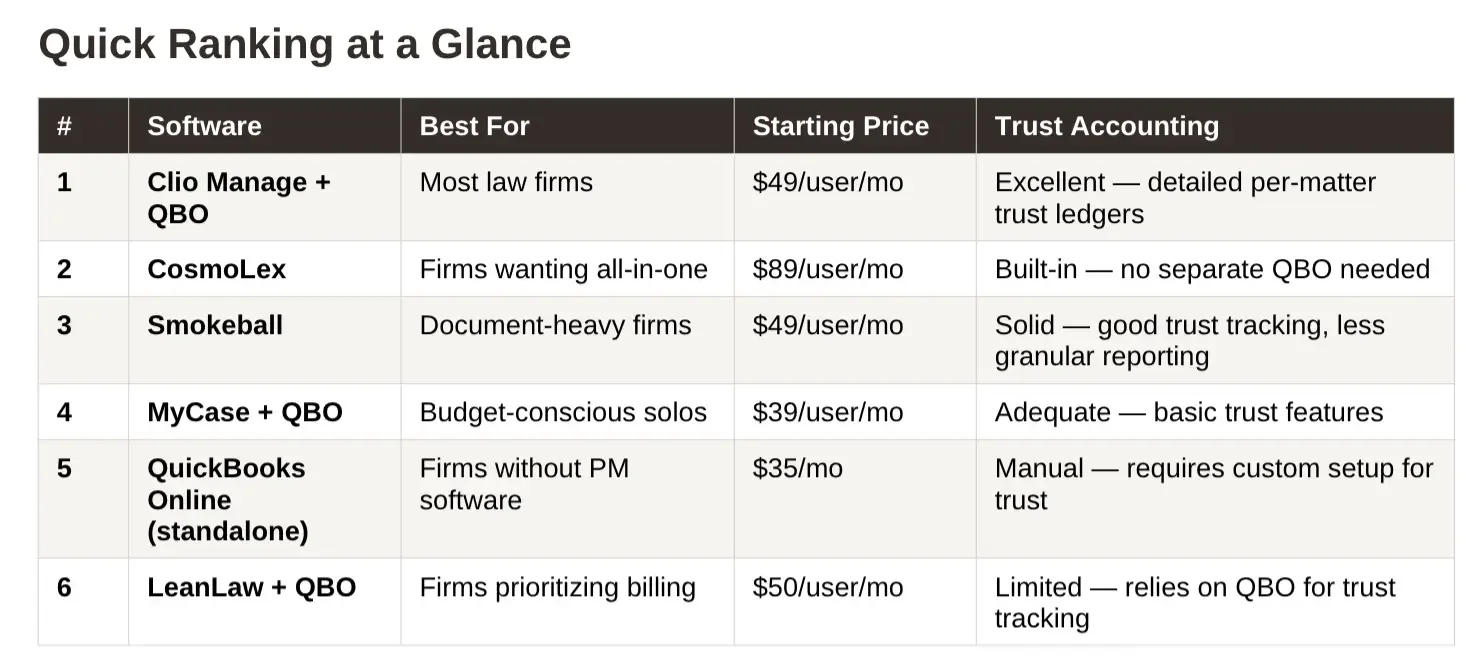
1. Clio Manage (with Clio Accounting): Best for Firms That Want the Largest Ecosystem
Best for: Solo and small firms that want practice management, billing, and accounting in one environment with 250+ integrations.
Clio is my top recommendation for a reason: the trust accounting is the most detailed of any practice management platform I work in, the QBO integration is the most mature, and the financial reporting gives bookkeepers what they need without hours of reformatting.
Trust accounting: Clio Manage handles trust ledgers, client-level balances, and three-way reconciliation natively. Clio Accounting, launched February 2026, adds a built-in general ledger so firms no longer need QuickBooks for operating-side bookkeeping. The current release supports cash-basis accounting only.
The per-matter trust ledgers are clean. The audit trails make three-way reconciliations straightforward. If your state bar came knocking, you’d feel confident handing over Clio’s trust reports. For billing, Clio handles everything from simple hourly to LEDES format for insurance defense work.
QBO integration: Before Clio Accounting, the standard setup was Clio Manage synced to QuickBooks Online. That integration is mature and well-documented, but it creates a two-system workflow where your bookkeeper reconciles between Clio and QBO monthly. Clio Accounting eliminates that second system for firms comfortable with cash-basis reporting.
The downside: Clio has a steeper learning curve than MyCase or Smokeball. It takes longer to configure, and attorneys who just want something simple may feel overwhelmed. It’s also not cheap - most small firms end up on the $89/user/month Essentials plan.
Pricing
EasyStart: $49/user/month
Essentials: $89/user/month (most popular)
Advanced: $129+/user/month
Strength: The integration ecosystem is unmatched. If you use Lawmatics for intake, Docketbird for court tracking, or any of 250+ legal tools, Clio connects to them. No other platform comes close on third-party integrations.
Limitation: Clio Accounting launched in February 2026 and currently supports cash-basis accounting only. Firms that need accrual-basis reporting still need QuickBooks. The two-system Clio + QBO workflow creates reconciliation work that single-platform tools avoid.
Read my detailed comparison: Clio vs MyCaseClio vs Smokeball
For a full breakdown of what each Clio plan includes and what you'll actually pay, see Clio Pricing Explained: What Law Firms Actually Pay
2. CosmoLex: Best Legal Accounting Platform with a QuickBooks Option
Best for: Solo and small firms that want strong built-in trust accounting and the choice between CosmoLex native business accounting or QuickBooks Online.
CosmoLex is built around legal accounting. Trust accounting, client ledgers, bank reconciliation, billing, and financial reporting are part of the practice-management platform. Core includes trust accounting, compliance reporting, and bank reconciliation. Pro adds General Ledger & Payables, bank feeds, and advanced compliance reporting.
CosmoLex also now integrates with QuickBooks Online, so firms can use CosmoLex for the legal workflow without giving up QBO for the business books.
Trust accounting: CosmoLex maintains client-level trust ledgers, provides a dedicated three-way reconciliation report, and has built-in safeguards designed to prevent negative trust ledger balances. Its three-way report compares the reconciled bank balance, CosmoLex book balance, and individual client trust-ledger balances.
This remains one of CosmoLex’s strongest features.
QBO integration: CosmoLex now offers a one-way QuickBooks Online integration on both Core and Pro. Data flows from CosmoLex to QBO. When the integration is enabled, CosmoLex Business Accounting and Matter Budgets are unavailable, so the firm is making a real accounting-system choice rather than maintaining two general ledgers.
From the bookkeeping side, this change makes CosmoLex much more compelling to me.
Practice-management-native accounting is designed around legal workflows. QuickBooks Online is designed around running the business.
I can work with either setup, but for most firms I prefer CosmoLex + QBO because QuickBooks gives the bookkeeping team more flexibility around bank activity, expenses, revenue, account structure, reconciliations, and financial reporting. If a firm strongly prefers keeping everything inside CosmoLex and its accounting needs fit the native system, that can still work.
Pricing
- Core: $99/user/month
- Pro: $129/user/month
Annual billing currently saves $120 per user per year. Firms that want CosmoLex’s full native General Ledger & Payables functionality should compare the Pro plan.
Strength: Strong legal and trust-accounting architecture with the flexibility to use either CosmoLex native business accounting or QuickBooks Online.
Limitation: CosmoLex’s native accounting environment is more constrained than QuickBooks Online for broader business financial management, and its third-party integration ecosystem is smaller than Clio’s.
Read my updated CosmoLex review for a deeper look at native CosmoLex accounting versus CosmoLex + QuickBooks Online.
3. Smokeball: Best for Firms That Bill High Volume with Document Automation
Best for: Small firms (2-8 attorneys) with high case volume that need document automation alongside billing and accounting.
Smokeball’s strength isn’t accounting - it’s document automation. If your firm produces a high volume of court filings, contracts, or estate documents, Smokeball’s deep Microsoft Office integration and automated document assembly can save hours per week.
Trust accounting: Smokeball handles trust ledgers and client-level balances. Trust accounting features are included in all plans, but the depth of trust reporting varies by tier.
The trust accounting is solid. Transaction tracking by matter works, three-way reconciliation reports are available, and the system prevents trust overdrafts. But the reporting isn’t as granular as Clio, and the QBO integration only pushes journal entries (one-way) rather than a full two-way sync.
The standout feature is AutoTime - automatic background time tracking that captures billable work attorneys forget to record. For firms with poor time-entry habits, this alone can justify the platform.
QBO integration: Smokeball syncs financial data to QuickBooks Online. The integration covers invoices and payments, but trust reconciliation requires verification in both systems. Your bookkeeper maintains two platforms.
The downside: Full trust account integration with QBO requires a higher-tier plan (Boost at $89/user/month or above). The Bill plan ($49) only gets you General Ledger integration. Some users report significant price increases at contract renewal.
Pricing
Bill: $49/user/month
Boost: $89/user/month
Grow: Contact for pricing
Prosper+: Contact for pricing
Strength: Document automation is the standout feature. Smokeball auto-generates documents from case data and tracks billable time passively. For high-volume practices (personal injury, real estate closings), the document workflow saves hours per week.
Limitation: Accounting features are secondary to practice management. Firms with complex trust accounting needs will find the trust reporting less detailed than Clio or CosmoLex. The QBO integration adds reconciliation overhead.
Read my detailed comparison: Clio vs Smokeball
4. MyCase: Best for Solo Attorneys Who Prefer a Low Learning Curve
Best for: Solo attorneys and small firms (1-3 attorneys) that want time tracking, billing, and basic accounting without a steep learning curve.
MyCase is the easiest practice management platform to learn. If you’re a solo attorney who doesn’t want to spend two weeks configuring software, MyCase gets you productive within a day or two. The interface is clean, the billing is straightforward, and the price is right.
Trust accounting: Included on all plans at no additional cost. MyCase tracks trust balances per client and supports basic trust reporting. The accounting add-on ($39/month flat, not per user) adds a profit-and-loss statement, expense tracking, and firm-level bookkeeping.
The trust accounting handles the basics. The QBO integration works but requires more manual cleanup than Clio’s - data doesn’t always land in QBO the way you’d expect, and your bookkeeper will spend more time reconciling.
MyCase is a great starting point, but firms tend to outgrow it. I’ve seen attorneys switch from MyCase to Clio once they add associates or their trust accounting volume increases.
QBO integration: MyCase syncs invoices and payments to QuickBooks Online. The integration covers the basics, but trust transactions require manual verification in QBO. Your bookkeeper will work in both systems.
The downside: Trust accounting reporting is basic compared to Clio. The QBO sync needs more babysitting. Less flexibility for complex billing scenarios.
Pricing
Basic: $39/user/month (annual) or $49 monthly
Pro: $89/user/month
Advanced: $109/user/month (annual) or $119 monthly
Strength: The interface is the most approachable in this category. Attorneys who avoid software adoption tend to stick with MyCase because it stays out of their way. The flat-rate accounting add-on is cost-effective for firms with multiple users.
Limitation: Trust accounting depth is shallow compared to Clio or CosmoLex. No three-way reconciliation report built into the platform. Your bookkeeper will likely still need QBO for the general ledger, and the sync between MyCase and QBO requires monthly verification.
Read my detailed comparison: Clio vs MyCase
5. QuickBooks Online (Standalone): Best Budget Option for Firms Without Trust Accounts
Best for: Flat-fee practices, transactional firms, and attorneys who do not hold client trust funds.
QuickBooks Online is not practice management software. It’s accounting software. But many solo attorneys start with just QBO before they’re ready to invest in a full practice management platform, and it can work - with proper setup.
Trust accounting: QuickBooks Online was not built for legal trust accounting. You can configure separate bank accounts and classes to approximate trust tracking, but QBO has no concept of client-level trust ledgers, three-way reconciliation, or overdraft prevention. State bar auditors will not accept a QuickBooks trust account setup unless it has been configured by someone who understands IOLTA requirements.
The key challenge is trust accounting. QBO doesn’t have built-in IOLTA trust tracking. You have to manually set up separate bank accounts in QBO for your trust account, create a trust liability account, and track client trust balances either through sub-customers or a separate ledger. It works, but it requires discipline and bookkeeping knowledge.
For firms that already have a bookkeeper and just need clean financial reporting without practice management features, standalone QBO is fine. But for most law firms, pairing it with Clio or MyCase is the better long-term move.
The downside: No built-in time tracking, no case management, no client portal. Trust accounting is entirely manual setup. You’re doing more work in QBO to get results that practice management platforms handle automatically.
Pricing
Simple Start: $35/month
Essentials: $65/month
Plus: $99/month
Strength: Every bookkeeper and CPA knows QuickBooks. Reporting is flexible, the app ecosystem is massive, and it handles operating-side accounting (payroll, AP, AR, financial statements) better than any legal-specific platform.
Limitation: If you hold client trust funds, standalone QuickBooks is not sufficient. You need a legal billing tool on top of it (LeanLaw, Clio, MyCase) to handle trust accounting compliantly. The "budget option" becomes more expensive once you add the legal layer.
6. LeanLaw (with QuickBooks Online): Best for Firms That Want to Stay in QuickBooks
Best for: Firms that already use QuickBooks Online and want to add legal billing and trust accounting without switching to a legal-specific platform.
LeanLaw sits on top of QuickBooks Online and adds legal-specific billing features - LEDES billing, trust tracking, matter-based time entry, and legal invoicing. Think of it as a billing overlay for QBO rather than a full practice management platform.
If you’re already invested in the QuickBooks ecosystem and don’t want to add a full practice management platform, LeanLaw bridges the gap. The billing features are strong, especially for firms doing insurance defense or other LEDES-required work.
Trust accounting: LeanLaw builds trust accounting directly inside QuickBooks Online. Trust deposits, disbursements, and client ledgers all live in QBO. Three-way reconciliation reports generate from within LeanLaw. This is the only platform where trust accounting and general ledger accounting happen in the same database.
For trust accounting, LeanLaw relies heavily on the QBO integration to track trust balances. It’s not as standalone as Clio’s or CosmoLex’s trust features.
QBO integration: LeanLaw does not integrate with QuickBooks. It operates inside QuickBooks. Your bookkeeper works in one system. Billing data, trust transactions, and operating expenses all live in QBO with LeanLaw as the legal layer on top.
The downside: It’s a billing tool, not a full practice management platform. No case management, no document automation, no client portal (beyond payment links). You need QBO as a prerequisite, so you’re paying for both.
Pricing
LeanLaw: $50/user/month (plus your QBO subscription)
Strength: Your bookkeeper and CPA already know QuickBooks. No migration, no new system to learn, no data export headaches. For firms with an existing QBO setup and a bookkeeper who works in it, LeanLaw is the fastest path to compliant trust accounting.
Limitation: You are locked into the QuickBooks ecosystem. If Intuit raises QBO prices or changes features (which happens regularly), your entire legal accounting workflow is affected. LeanLaw Pro is required for LEDES billing. The combined cost of LeanLaw + QBO can exceed single-platform options like CosmoLex.
How Do You Choose Accounting Software for a Law Firm?
The first question is whether your firm holds client trust funds. If yes, standalone QuickBooks is off the table. You need a platform with three-way reconciliation, client-level trust ledgers, and overdraft prevention. That narrows the field to Clio, CosmoLex, LeanLaw, or MyCase with the accounting add-on.
The second question is where you want the general ledger to live. CosmoLex and Clio both offer native accounting options, and both can also work with QuickBooks Online. Practice-management-native accounting is designed around legal workflows. QuickBooks Online is designed around running the business. For most firms, I prefer QBO as the general accounting system because it gives the bookkeeping team more flexibility to manage the broader financial operation of the firm.
The third question is who does your books. If your bookkeeper or CPA already works in QuickBooks Online, both CosmoLex and Clio can preserve that workflow. If your firm strongly prefers keeping accounting inside the legal platform, native accounting is available. But I would not move a clean, established QBO file solely for the sake of reducing the number of software platforms.
Price matters less than total workflow cost. A lower software subscription can be offset by additional bookkeeping time if the accounting tools are harder to work in or more constrained. The goal is not the fewest software platforms. The goal is the cleanest financial system.
After setting up and reconciling these platforms for dozens of law firms, here’s the decision framework I use:
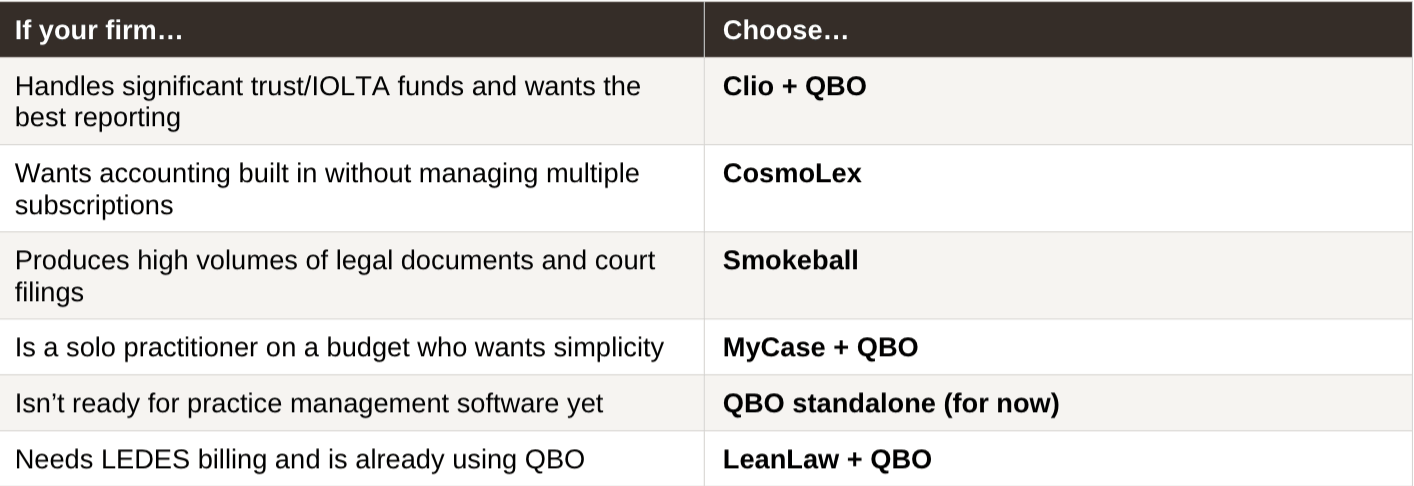
What No Accounting Software Will Tell You
No software on this list replaces proper bookkeeping. I see this constantly - attorneys invest in Clio or CosmoLex and assume their finances are handled. They’re not.
Software tracks transactions. Bookkeeping ensures those transactions are accurate, properly categorized, reconciled against your bank statements, and compliant with your state bar’s trust accounting rules. Without someone doing that work every month, you’re flying blind.
Your trust account could be out of balance. Your revenue numbers could be wrong. Your chart of accounts could be a mess of miscategorized transactions. And you wouldn’t know until tax season or, worse, a bar audit.
Three-way reconciliation is a report. It confirms that three records match: your bank statement, your individual client ledgers, and your general ledger trust liability account. State bars require it. Fewer than 60% of small law firms do it consistently (2023 ABA TechReport). The software generates the report. Someone still has to review it, investigate discrepancies, and fix the entries that caused them.
Whichever software you choose, make sure someone - whether it’s you or a bookkeeper who understands law firm accounting - is reconciling your practice management data against your bank statements every single month.
If you're specifically evaluating billing and invoicing tools, see the full ranking in Best Legal Billing Software for Law Firms (2026).
For a deeper look at what proper law firm bookkeeping involves, visit our law firm bookkeeping services.
Related Reading
How Do You Choose Accounting Software for a Law Firm?
-
The best accounting software depends on whether your firm holds client trust funds and where you want the general ledger to live. CosmoLex Core starts at $99/user/month and includes trust accounting, compliance reporting, and bank reconciliation. CosmoLex Pro is $129/user/month and adds General Ledger & Payables and bank feeds. Firms that prefer QuickBooks Online can now use CosmoLex with QBO instead of moving the business books into CosmoLex.
-
For small firms, CosmoLex and Clio remain strong options, but the accounting decision is more flexible than it used to be. CosmoLex now supports either native business accounting or a QuickBooks Online configuration, while maintaining its legal and trust-accounting workflows.
From the bookkeeping side, I generally prefer keeping QuickBooks Online as the general accounting system because it gives the firm and its accounting team more flexibility. Native accounting can still make sense for firms that strongly prefer a consolidated legal and accounting platform.
-
Both CosmoLex and Clio now support three-way trust reconciliation. CosmoLex has a mature trust-accounting architecture with client-level ledgers, built-in trust safeguards, and a dedicated three-way reconciliation report. Clio also provides client trust ledgers and three-way reconciliation.
I would not choose between them solely based on whether either platform has trust accounting. The better comparison is the complete monthly trust workflow, how the underlying client ledgers are maintained, and where the firm wants its general ledger to live.
-
QuickBooks Online works for law firms that do not hold client trust funds, such as flat-fee or transactional practices. If your firm holds trust funds, standalone QuickBooks is not sufficient because it lacks client-level trust ledgers, three-way reconciliation, and overdraft prevention. You can add LeanLaw on top of QuickBooks to get compliant trust accounting inside QBO, or pair QuickBooks with Clio or MyCase for billing and trust management. A bookkeeper experienced with law firms should configure the chart of accounts and trust account structure regardless of which approach you take.
-
Law firm accounting software pricing varies considerably by platform, plan, accounting configuration, and user count. CosmoLex currently lists Core at $99/user/month and Pro at $129/user/month on monthly billing, with annual billing saving $120 per user per year.
For firms using CosmoLex’s full native business accounting, Pro is the relevant comparison because General Ledger & Payables and bank feeds are Pro features. Firms using CosmoLex + QuickBooks Online should also include the cost of their QBO subscription.
Software price should not be evaluated in isolation. The bookkeeping time required to maintain the system is part of the real cost.
-
CosmoLex Pro and Clio’s native accounting can combine legal billing and general accounting within the practice-management environment. Both platforms can also work with QuickBooks Online, allowing the legal workflow to remain in the practice-management system while QBO handles the broader business accounting.
-
Law firms that hold client trust funds need software that supports client-level trust ledgers, three-way reconciliation, and separation between trust and operating accounts. Standard small business accounting software does not include these features. Firms that do not hold trust funds (flat-fee practices, some transactional work) can use QuickBooks or similar general accounting tools without legal-specific features. The trust accounting requirement is what separates law firm accounting from general small business accounting.
-
Clio Manage connects to QuickBooks Online through a native integration that syncs invoices, payments, and expense data. The integration does not sync trust transactions automatically, so your bookkeeper must verify trust deposits and disbursements in both systems during monthly reconciliation. Firms that want to eliminate the two-system workflow can add Clio Accounting ($29/user/month) to handle general ledger accounting inside Clio instead of QuickBooks. The Clio-QBO integration works best when a bookkeeper familiar with both systems reviews the sync monthly and catches discrepancies before they compound.
About the Author
Amy is the founder of Accounting Atelier, a boutique bookkeeping firm that works exclusively with solo and small law firms. She’s a QuickBooks Online ProAdvisor, Clio Certified Partner, and MyCase Partner with over 25 years of small business accounting experience. She and her team handle monthly bookkeeping, trust accounting, IOLTA compliance, and three-way reconciliations for law firms across the country.
If your firm needs help choosing and setting up accounting software, or just wants clean books every month, book a free consultation at accountingatelier.com/contact