CosmoLex Review: Does It Actually Replace QuickBooks for Law Firms?
Updated August 2026. Last verified August 29, 2026.
CosmoLex has always stood out for one reason: it combines legal practice management with built-in legal accounting, including trust accounting, bank reconciliation, billing, financial reporting, and client trust ledgers.
But one of the biggest assumptions about CosmoLex changed in 2026.
CosmoLex now integrates with QuickBooks Online.
So the question is no longer just whether CosmoLex can replace QuickBooks.
The better question is whether your law firm should use CosmoLex’s native accounting or keep QuickBooks Online as part of the accounting system.
CosmoLex can still function as the accounting platform for a law firm. But firms that want to keep QBO can now use a one-way CosmoLex → QuickBooks Online integration instead. CosmoLex says the QBO integration is available on its Core and Pro plans at no additional CosmoLex charge; when it is enabled, CosmoLex Business Accounting and Matter Budgets are unavailable. CosmoLex QBO integration details
That change makes CosmoLex considerably more flexible than it was when I first reviewed it.
After working with law firms using CosmoLex, here is my updated take on its accounting, trust accounting, pricing, QuickBooks integration, strengths, limitations, and which setup makes the most sense for different firms.
CosmoLex Review: The Short Answer
CosmoLex is one of the strongest legal practice-management options for firms that want accounting and trust accounting closely connected to their matter-management system.
Its biggest advantage is still its legal-specific financial structure. Trust ledgers, trust reconciliation, billing, bank activity, and accounting records can be maintained inside the same legal system rather than relying entirely on a separate general accounting platform.
Its biggest 2026 improvement is flexibility: a firm can now use CosmoLex with QuickBooks Online instead of having to choose one or the other.
My view from the bookkeeping side:
CosmoLex native accounting makes the most sense when a firm genuinely wants its legal and financial records consolidated into one system.
CosmoLex + QuickBooks Online is more compelling when the firm already has a mature QBO file, works with an accountant or bookkeeping team that prefers QBO, or wants the broader accounting ecosystem and reporting flexibility available through QuickBooks Online.
Neither setup is automatically better. The important part is deciding which system will actually serve as the accounting system before building the firm’s monthly bookkeeping workflow around it.
What Is CosmoLex?
CosmoLex is cloud-based legal practice-management software built specifically for law firms.
It combines practice-management functions such as matters, calendaring, tasks, documents, timekeeping, billing, payments, and client communication with legal accounting and trust-accounting functionality.
Depending on the firm’s plan and configuration, CosmoLex can support:
Matter and practice management
Time and expense tracking
Legal billing and retainers
Client trust ledgers
Trust-account reconciliation
Three-way reconciliation reporting
Bank reconciliation
Financial and productivity reporting
General-ledger and accounts-payable functions
Bank feeds
QuickBooks Online integration
Client portal and intake functionality
CosmoLex’s current pricing page lists trust accounting and ledgers, compliance reporting, bank reconciliation, and financial reporting among its legal-accounting features, with additional accounting capabilities varying by plan. View current CosmoLex pricing and features
That accounting-first approach remains the primary reason to consider CosmoLex over a practice-management system that treats the general ledger as a separate system.
How Much Does CosmoLex Cost in 2026?
As of August 29, 2026, CosmoLex lists:
Core: $99 per user/month
Pro: $129 per user/month
CosmoLex also offers annual billing and currently advertises savings of $120 per user per year. Features differ between Core and Pro, so firms should review the current feature table rather than comparing the plans on price alone. Current CosmoLex pricing
This pricing comparison used to be relatively simple:
CosmoLex includes accounting, while a firm using another practice-management platform may also need QuickBooks.
That is no longer the entire calculation.
If a firm chooses CosmoLex + QuickBooks Online, it will also have the cost of its QBO subscription.
So when evaluating price, compare the actual accounting configuration:
CosmoLex with native accounting
versus
CosmoLex + QuickBooks Online
versus
another legal practice-management platform + its accounting system.
If you are comparing practice-management options more broadly, I also break down Clio vs. MyCase and maintain a separate CosmoLex vs. Clio comparison.
Does CosmoLex Replace QuickBooks?
Yes, CosmoLex can replace QuickBooks for a law firm - but as of 2026, it no longer has to.
That distinction matters.
CosmoLex was designed with native business and trust accounting so a law firm could manage legal and financial activity without maintaining a separate QuickBooks file.
For firms that want that model, the case for native CosmoLex accounting is still strong.
But CosmoLex now also offers QuickBooks Online integration for firms that have a legitimate reason to keep QBO.
According to CosmoLex, the integration:
Is available on Core and Pro
Costs no additional CosmoLex integration fee
Sends data one way from CosmoLex to QuickBooks Online
Makes CosmoLex Business Accounting unavailable while enabled
Makes Matter Budgets unavailable while enabled
May involve migration charges if a firm later returns to CosmoLex native accounting
CosmoLex itself describes the QBO option as a tradeoff rather than an automatic upgrade. Read CosmoLex’s QBO integration explanation
That is exactly how I would look at it from the accounting side.
You are choosing an accounting architecture.
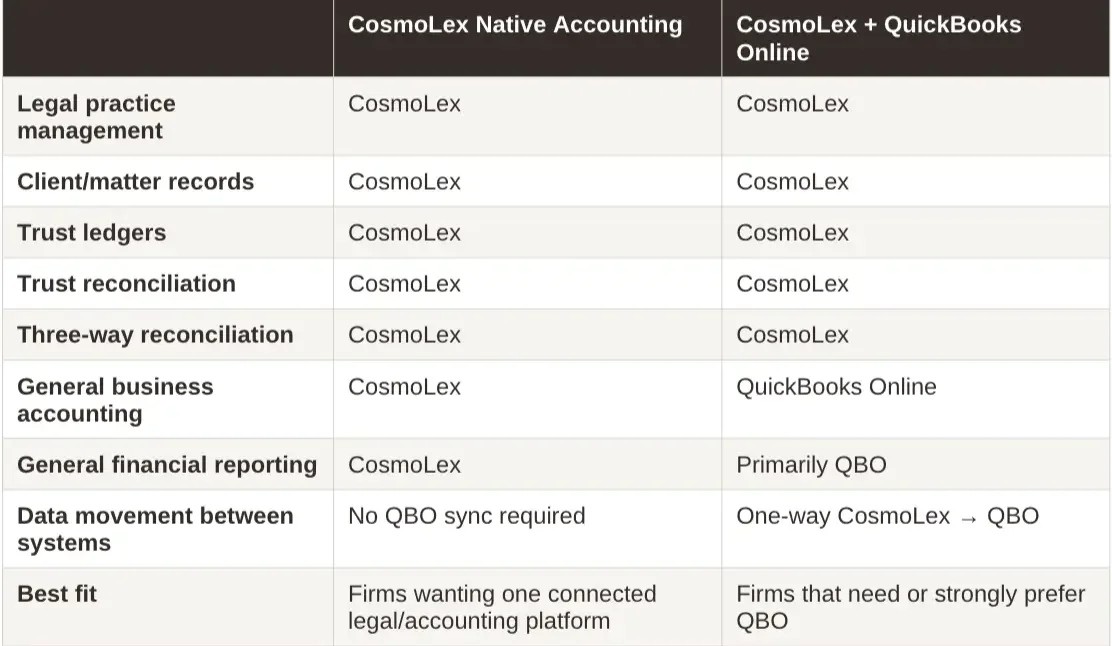
CosmoLex Native Accounting vs. CosmoLex + QuickBooks Online
When I Would Consider CosmoLex Native Accounting
Native accounting is worth considering when the firm wants to reduce the number of financial systems it maintains and its accounting requirements fit comfortably within CosmoLex.
It can remove a major handoff between legal billing and the accounting system.
There is no separate practice-management-to-QBO sync to monitor for the general accounting workflow.
That is a real benefit.
When I Would Consider CosmoLex + QuickBooks Online
I would look more closely at the QBO configuration when:
The firm already has significant accounting history in QuickBooks Online.
Its CPA or accounting team works primarily in QBO.
The firm relies on QBO-connected accounting, payroll, reporting, or expense tools.
Management wants the broader reporting and accounting ecosystem available in QuickBooks.
There is no compelling reason to migrate the entire business-accounting system into CosmoLex.
I generally prefer QBO when a firm wants more depth and flexibility from its general accounting system.
What changed in 2026 is that preferring QBO no longer automatically means ruling out CosmoLex.
That is a significant improvement.
CosmoLex Trust Accounting: This Is Still the Standout Feature
For law firms that handle client funds, this is the part of CosmoLex I pay the most attention to.
CosmoLex maintains individual client trust ledgers and provides a dedicated three-way reconciliation report.
CosmoLex defines that report as a comparison of:
The reconciled trust bank balance
The book balance in CosmoLex
The individual client trust-ledger balances
A trust-bank reconciliation must be completed before the three-way reconciliation report can be generated. CosmoLex Three-Way Reconciliation Report documentation
That is a much more useful financial structure for a law firm than expecting generic bookkeeping software alone to understand client trust balances.
One Important Distinction
Having three-way reconciliation software does not mean the trust accounting is automatically correct.
The underlying transactions still have to be entered correctly.
Outstanding items still have to be investigated.
Client balances still need to be accurate.
The bank reconciliation still needs to be completed correctly.
And the attorney remains responsible for the trust-accounting and recordkeeping requirements that apply in the firm’s jurisdiction.
CosmoLex provides the accounting structure and reports. It does not replace the professional judgment required to review the records behind them.
Learn more about trust-account reconciliation for law firms.
What CosmoLex Does Well
Legal and Accounting Records Can Live Much Closer Together
This is still the strongest argument for native CosmoLex accounting.
Legal billing, trust activity, client matters, bank records, and accounting activity originate within the same legal environment.
That removes some of the handoffs created when a practice-management platform and accounting system operate separately.
For the right firm, fewer handoffs mean fewer places to investigate when something does not agree.
Trust Accounting Is Built Around Law-Firm Records
QuickBooks is a general accounting platform.
CosmoLex starts with legal-specific concepts such as matters, trust ledgers, trust transactions, and three-way reconciliation.
For firms with active IOLTA accounts, that difference matters.
CosmoLex also provides trust journals, trust receipts and disbursement reports, client trust ledgers, trust balance reports, and reconciliation reporting within its legal accounting system. CosmoLex trust-accounting documentation
Bank Reconciliation Is Integrated With the Accounting Workflow
CosmoLex allows firms to reconcile operating, trust, and credit-card accounts and supports transaction matching through bank feeds or imported bank activity.
Its reconciliation workflow is designed to compare the accounting records against bank activity and identify differences before a statement is finalized. CosmoLex bank reconciliation documentation
For trust accounts, completing that bank reconciliation is also what allows the three-way report to be generated.
The QuickBooks Integration Removes a Major Objection
This is the biggest strategic change to the product.
Previously, a firm that strongly preferred QuickBooks had a good reason to rule CosmoLex out.
That is no longer true.
A firm can now keep the law-firm workflow in CosmoLex while maintaining QuickBooks Online for the general accounting side. CosmoLex QBO integration details
That makes CosmoLex relevant to a much wider set of law firms.
The Interface Has Been Modernized
My original review criticized the interface as dated.
I would not make that same blanket statement in 2026.
CosmoLex has redesigned frequently used grids across the platform and added consistent searching and filtering, pinned columns, locked headers, hover details, improved date filters, banking quick search, and other usability improvements. CosmoLex March 2026 interface update
That does not mean everyone will prefer the interface.
But the current product deserves to be evaluated on the current interface, not on what it looked like a year ago.
Where CosmoLex Still Falls Short
There Is More Accounting Complexity to Learn
CosmoLex does more financial work inside the legal platform than many traditional practice-management systems.
That creates an advantage, but it also creates a learning curve.
The person working in the accounting side needs to understand what a transaction is doing, where it is posting, which account or matter it affects, and how that activity appears in reconciliation and reporting.An all-in-one system is not automatically a simpler accounting system.
Native CosmoLex Accounting Is Not the Same as QuickBooks Online
CosmoLex is purpose-built for law firms.
QuickBooks Online is a much broader general accounting platform. If a firm’s needs are primarily normal law-firm bookkeeping, CosmoLex native accounting may be enough.
But QBO has a larger general-accounting ecosystem and may be a better fit when the firm wants more flexibility around accounting integrations, payroll, expense management, reporting, outside-accountant workflows, or other financial systems.
That is now less of a reason to reject CosmoLex because QBO integration exists.It is instead a reason to choose the right CosmoLex configuration.
CosmoLex Has a Smaller Third-Party Ecosystem Than Clio
CosmoLex integrates with common tools including Microsoft 365, QuickBooks Online, Dropbox, Zapier, document systems, and other business applications. Current CosmoLex integrations
Clio, however, has a substantially broader app ecosystem.
For firms that rely on a large number of specialized legal applications, that difference still deserves serious consideration.
For firms that are actively trying to reduce the number of separate systems they use, CosmoLex’s more consolidated model may actually be an advantage.
Firm Complexity Matters More Than Attorney Count
I previously described CosmoLex as being best for firms of roughly 1–10 attorneys.
I would not use that rule anymore.
Accounting complexity matters more.
A five-attorney firm with complicated payroll, multiple entities, heavy reporting requirements, several bank accounts, and a large technology stack can have a more complicated financial system than a much larger firm.
The better question is:
Can CosmoLex’s accounting configuration support the way this firm actually operates?
If yes, attorney count alone should not disqualify it.
If no, adding QuickBooks Online or choosing another stack may make more sense.
Who Is CosmoLex Best For?
CosmoLex Native Accounting Is Particularly Compelling for Firms That:
Want legal practice management and accounting closely connected.
Handle trust funds and value built-in client ledgers and three-way reconciliation reporting.
Want to reduce the number of systems involved in the monthly financial workflow.
Do not have a compelling reason to keep QuickBooks Online.
Have accounting requirements that fit CosmoLex’s native capabilities.
CosmoLex + QuickBooks Online Is Particularly Compelling for Firms That:
Already have a mature QBO file.
Work with a bookkeeper or accountant that primarily uses QuickBooks.
Want CosmoLex’s legal and trust-accounting tools without migrating general accounting out of QBO.
Depend on the broader QBO accounting ecosystem.
Prefer QBO for business reporting and general-ledger management.
I Would Look Harder at Another Platform If:
Your firm depends heavily on integrations CosmoLex does not support.
Your practice-management requirements matter much more than the built-in accounting capabilities.
Your team will not consistently use the accounting workflows required by the system.
Another platform fits the firm’s operational workflow materially better.
For a broader look at the options, see Best Accounting Software for Law Firms.
CosmoLex vs. Clio: Which Is Better?
There is no universal winner.
CosmoLex has the stronger argument when integrated legal accounting and trust accounting are major factors in the software decision.
Clio has the stronger argument when a firm prioritizes a broader practice-management and third-party integration ecosystem.
The comparison became more nuanced in 2026 because CosmoLex now supports QuickBooks Online.
Previously, the decision could often be reduced to:
CosmoLex = one accounting/practice-management system
versus
Clio + QBO = two connected systems
That is no longer completely accurate.
CosmoLex can now be run either with native accounting or with QBO.
For a detailed feature-by-feature comparison, read CosmoLex vs. Clio: Which Is Better for Your Law Firm’s Books?.
Can a Bookkeeper Work in CosmoLex?
Yes.
CosmoLex is built to accommodate bookkeeping and accounting work, and CosmoLex itself promotes bookkeeping support trained to work within its system.
Its own bookkeeping-services page describes bookkeeping work such as reconciling bank and credit-card accounts, reviewing financial statements, adjusting existing transactions, closing the prior month, and reporting on areas of concern involving trust activity. CosmoLex bookkeeping and payroll services
The more important question in 2026 is:
Which accounting configuration is the bookkeeper managing?
A CosmoLex-native engagement is different from a CosmoLex + QBO engagement.
The bookkeeper should understand where the legal records live, where the general ledger lives, how trust activity is maintained, how month-end reconciliation is completed, and which system is responsible for which financial records.
My Take on CosmoLex in 2026
CosmoLex is more interesting to me now than it was when I first reviewed it.
Its core strength has not changed.
CosmoLex understands that law-firm accounting is connected to matters, trust balances, client ledgers, billing, and legal financial workflows.
What changed is that a law firm no longer has to accept CosmoLex’s native business accounting in order to use the platform.
That gives firms a legitimate choice.
If the firm wants the most consolidated setup possible, CosmoLex native accounting deserves consideration.
If the firm prefers the depth, familiarity, and broader ecosystem of QuickBooks Online, the CosmoLex + QBO configuration may now be the stronger fit.
So my answer to the headline question is:
Yes, CosmoLex can replace QuickBooks. But in 2026, the better question is whether it should.
That decision should be made based on the firm’s accounting requirements, trust-account workflow, existing financial history, reporting needs, and who will actually be responsible for the books each month.
For a detailed side-by-side comparison, read my full CosmoLex vs Clio guide.
Already Using CosmoLex?
CosmoLex can provide the accounting structure.
Your monthly books still need to be reviewed, reconciled, and maintained correctly.
Accounting Atelier specializes in bookkeeping for law firms, including trust-account bookkeeping, three-way reconciliation, cleanup, and ongoing monthly financial management. For help setting up or correcting your firm’s accounting workflow, explore Accounting Atelier’s CosmoLex accounting setup and workflow review.
Whether your firm uses CosmoLex native accounting or CosmoLex + QuickBooks Online, the first step is understanding how the financial workflow is currently configured and where each part of the accounting record lives.
Learn about Accounting Atelier’s law-firm bookkeeping services.
About the Author
Amy Coats is the founder of Accounting Atelier, a bookkeeping firm specializing in law-firm bookkeeping, trust accounting, and financial management.
She has 25+ years of accounting and financial-management experience, with specialized expertise in law-firm bookkeeping.
Amy is a QuickBooks Online ProAdvisor, and Accounting Atelier is a Clio Certified Partner, MyCase Partner, and CosmoLex Partner.
Accounting Atelier works with law firms using CosmoLex, Clio, MyCase, QuickBooks Online, and other legal financial systems, providing monthly bookkeeping, trust-accounting support, three-way reconciliation, cleanup, and financial reporting.
Frequently Asked Questions
-
Yes. CosmoLex offers native legal accounting that can allow a law firm to operate without QuickBooks Online.
However, CosmoLex now also integrates with QBO, so firms that need or prefer QuickBooks can keep it rather than moving all business accounting into CosmoLex. CosmoLex QBO integration details
-
Yes. CosmoLex offers a one-way QuickBooks Online integration on Core and Pro at no additional CosmoLex charge. When the integration is enabled, CosmoLex Business Accounting and Matter Budgets are unavailable. CosmoLex QBO integration details
-
CosmoLex maintains legal trust-account records including client trust ledgers, trust transactions, bank reconciliation, trust reporting, and three-way reconciliation reporting. Its three-way reconciliation report compares the reconciled bank balance, CosmoLex book balance, and individual client trust-ledger balances. CosmoLex three-way reconciliation documentation
-
CosmoLex provides a dedicated Three-Way Reconciliation Report. The trust bank account must first have a completed reconciliation statement. CosmoLex then compares the reconciled bank balance, book balance, and individual client trust-ledger balances. CosmoLex three-way reconciliation documentation
-
As of August 29, 2026, CosmoLex lists Core at $99 per user/month and Pro at $129 per user/month for monthly billing. The company currently advertises savings of $120 per user per year with annual billing. Current CosmoLex pricing
-
It can be.
That is one of CosmoLex’s primary use cases: legal practice management, trust records, billing, reconciliation, and business accounting can be maintained much more closely within the same platform.
Whether eliminating QBO is the right choice depends on the firm’s reporting requirements, financial complexity, outside-accountant workflow, existing QuickBooks history, and accounting integrations.
-
Use native CosmoLex accounting when consolidating legal and business accounting into one system is the priority and CosmoLex’s accounting capabilities meet the firm’s needs.
Consider CosmoLex + QBO when the firm has an established QuickBooks workflow, needs the broader QBO accounting ecosystem, or works with an accounting professional who needs the business books in QuickBooks.
-
CosmoLex’s major advantage is that legal accounting and trust accounting can live within the same platform.
Clio has strong trust-management capabilities but historically has relied more heavily on separate accounting systems such as QuickBooks Online for the general ledger, although Clio’s own accounting product continues to evolve.
Which system is better depends on whether the firm prioritizes integrated accounting or the broader practice-management ecosystem.
-
Yes.
Accounting Atelier provides specialized bookkeeping for law firms and supports firms using CosmoLex, QuickBooks Online, Clio, and MyCase.
Our work may include monthly law-firm bookkeeping, trust accounting, three-way reconciliation, trust-account cleanup, software setup, and financial reporting depending on the engagement.
Learn more about Accounting Atelier’s law-firm bookkeeping services.